Weekly Scout Updates (Nov 2 to 8)
Scout picks up your brand context from your website, so you stop re-explaining who you are.

Here's what's new in Scout this week. Scout now picks up your brand context straight from your website and carries it into every search, so you stop re-explaining who you are. 👇
What's New This Week
- Scout pulls your brand context from your website. Drop in your URL and Scout drafts who you are and who you sell to, then reads it on every search. More on this below.
- Filter creator search by format and footage. Narrow a search to the kind of video you want, like a review, and to creators who shoot their own original footage instead of stock or clips.
- Deal terms in the price calculator. The sponsorship price calculator now prices category exclusivity and organic usage rights, so the number matches what you are actually asking a creator for.
Your Brand Context, Filled in For You
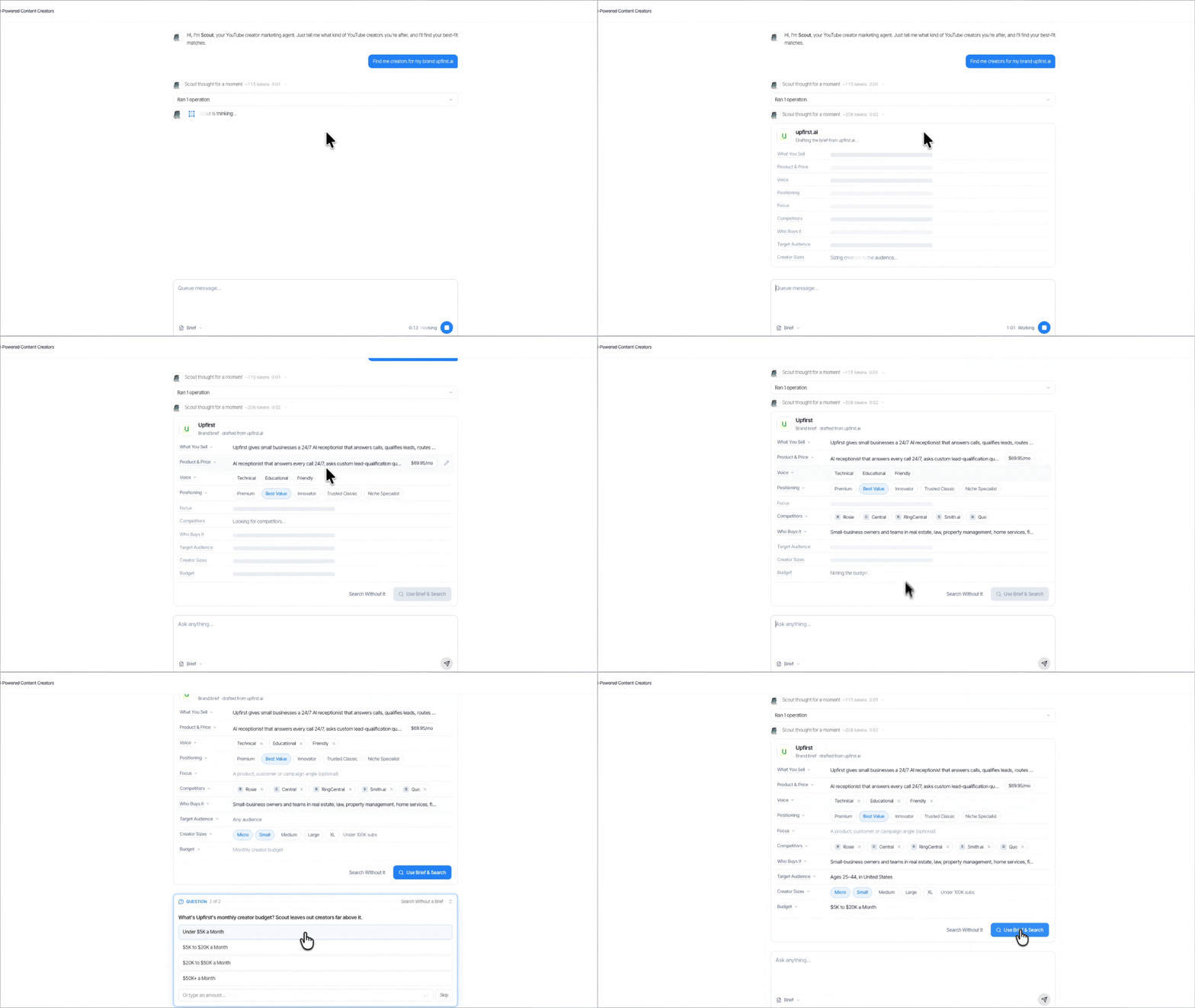
Ask Scout in a chat and it fills your brand context in from your site. You read it over, fix anything it got wrong, and every search from then on uses it. It covers:
- What you sell, and roughly what it costs
- Who you sell to: your customer, plus the countries, age ranges and gender you want reached. Leave one empty and it means anyone
- Who you are up against: the competitors Scout finds named on your own site
- How you buy: the creator sizes and budget that fit you
- One set per product line: Scout saves it as a brand brief, and you can keep more than one for the same website, so a brand with two products or two very different customers searches as each of them instead of averaging the two together
Then narrow by how the videos are actually made. If you're launching a gadget, a creator who shoots original hands-on footage in a review is a different buy from one who reacts to other people's clips, even when the audience looks identical on paper. Format and footage are now two separate filters you can stack on any search.
One caveat: we're still labelling the directory, so those two filters cover the creators we've labelled so far. That set grows every week.
Let Scout fill in your brand context:
More Soon
Two product lines, or two customers who look nothing alike? Tell us how you'd split them. We read every one.
In Case You Missed It
- Top Brands Spending on YouTube (Oct 19-25): Kalshi took the top spot from FanDuel, and three of the five biggest movers were sports betting and prediction markets.
- What a YouTube sponsorship should cost: price a read off real views, then add exclusivity and usage rights.
Cheers,
Sam
Frequently Asked Questions
How does Scout get my brand context?
Give Scout your website address in a chat and it reads the site, then drafts your brand context: what you sell, roughly what it costs, who you sell to, the countries, ages and gender you want reached, your competitors, the creator sizes you want and your budget. You read it over, fix anything it got wrong, and every search from then on uses it.
Can I keep more than one brand context?
Yes. Scout saves it as a brand brief, and you can keep more than one for the same website. A brand with two products, or two very different customers, searches as each of them instead of averaging the two together.
What happens if I leave an audience field empty?
It means anyone. Country, age range and gender are each optional, so you only narrow the audience on the things you actually want narrowed.
Can I search for creators by the kind of video they make?
Yes. You can now filter creator search by format, like a review or unboxing, and by footage, so you can ask for creators who shoot their own original footage instead of talking over someone else's clips.
Does the pricing calculator handle exclusivity and usage rights?
Yes. The YouTube sponsorship price calculator now prices category exclusivity and organic usage rights, so the number matches what you are actually asking a creator for.