Replace Spreadsheets with Scout: How to Run a Creator Program Without a Spreadsheet (2026)
Stop running your creator program from a spreadsheet. Upload the list you already have and Scout matches every row to a live YouTube channel, fills in verified emails, past sponsors, demographics, and a fit score, then runs outreach from the same table.

Upload the creator list you already have. Get it matched, enriched, scored, and ready for outreach, without an agency and without a second tool.
Quick answer: The fastest way to stop running your creator program out of a spreadsheet is Scout. Upload the sheet you already have and Scout matches every row to a live YouTube channel, fills in verified emails, past sponsors, audience demographics and a fit score, then lets you run outreach from the same table. Free to start at babbl-labs.com.
Why does a creator spreadsheet stop working?
A creator spreadsheet is a snapshot of what somebody knew on the day they built it. It has no way to tell you that a channel stopped uploading, that its rate doubled, or that your closest competitor sponsored it last month. Every column in it is a job someone has to keep doing by hand, which is why the columns end up half empty.
The instinct is right. Building the list is the correct first move. The problem is maintenance, and maintenance is the part software should be doing.
Three things break in the same order every time:
- Contact info goes stale first. Emails scraped from an About page rot faster than anything else in the sheet.
- Rates become guesses. A number typed in Q1 is fiction by Q3, and nobody wants to be the one to re-check forty of them.
- Conflicts stay invisible. Nothing in a spreadsheet tells you a creator is already running your competitor's product.
None of that is a discipline problem. It is a data problem, and it is the reason the sheet quietly stops getting opened.
How do I upload my creator list to Scout?
Upload the file exactly as it is. Scout reads your columns, matches each row to a real YouTube channel, and returns the matched creators in a table you can work in immediately. Messy is the normal case, so there is no cleanup step first.
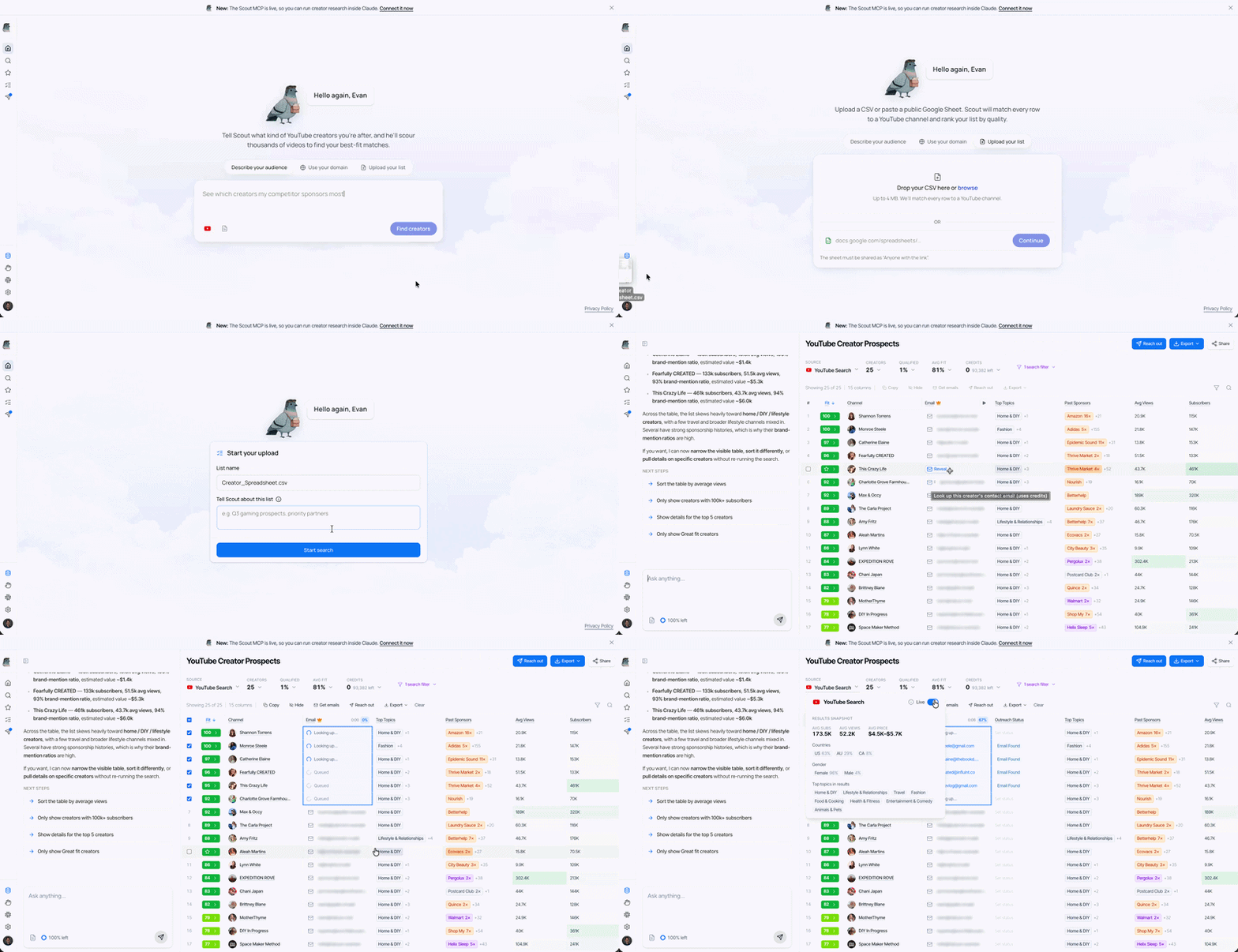
- Open Scout and start a new search.
- Choose Upload a list.
- Drop in your CSV or Google Sheet, whatever columns you already have.
- Scout resolves the rows against live YouTube data.
- The matched creators land in the table.
Scout works 25 at a time so the first pass stays fast. Ask for more and it goes deeper.
Try this in Scout: "Here is our creator list. Match these channels and pull emails, past sponsors, and fit for [yourbrand.com]."
What does Scout fill in automatically?
Scout attaches the live record for every matched channel: subscribers, average views, engagement, upload cadence, audience demographics, topics, past sponsors, and a fit score against your brand. All of it is sourced from YouTube data rather than typed by a person, so it updates instead of decaying.
Channel basics
Subscribers, average views, engagement, upload cadence, and the channel avatar, so the table reads like a roster instead of a list of strings.
Past sponsors
The brands a creator has actually worked with, extracted from the videos themselves rather than from tags, with the source video linked to each claim. This is the column that answers the question a spreadsheet never could: has a competitor already booked them?
Fit score
0 to 100, bucketed Great, Moderate, or Low. Click the caret for the per-criterion breakdown. Fit is scored against your brand, not against the internet, so it is not a popularity ranking. Change the brand and the ranking changes. For the full picture of how Scout reads a channel, see the Scout user guide.
Audience demographics
Country and gender splits on the audience, not the creator. This is the "are we even reaching our buyer" check, and it is worth doing before you talk about rates.
Topics and video examples
What the channel actually covers, with real videos attached, so you can verify a match in about ten seconds instead of opening YouTube in another tab.
Can I keep my own columns and notes?
Yes. Add your own columns to the same table and type straight into the cells. Budget, owner, status, deal stage, notes on the three creators you have already talked to. Your data sits next to Scout's data, in one place, with no export and re-import.
This is the part that actually retires the spreadsheet. Enrichment on its own would have meant keeping the old sheet around for everything Scout does not know about your business, which is not replacing a spreadsheet, it is adding a tab.
How do I find creator emails and send outreach?
Select the creators you want, pull their contact info, and Scout drafts the outreach for you. Sent messages and replies live in the same place as the list, so there is no separate campaign tool and no rebuilding the shortlist somewhere else.
- Select the creators you want. Click the checkbox on each row, or select rows in bulk.
- Click Get emails. Scout runs contact lookup across its own data and third-party sources.
- Click Reach out. Scout drafts the outreach for the creators you selected.
- Review before anything sends. The draft is yours to edit.
- Replies come back in the same place. Sent messages and responses live in the outbound tab.
If you are working out what to say and what to pay, How to Sponsor YouTubers covers rates, deal structure, and briefs.
How do I find more creators like the ones on my list?
Ask Scout to expand the list. It reads your uploaded creators as a description of what you are looking for, finds what they have in common, and returns channels like them. Then turn on Live and it keeps doing that on its own.
Expand the search. Scout treats the list as a statement of taste rather than a set of filters, which is why it works even when the shared trait is something you would struggle to write down as a rule.
Turn on Live. Flip the Live toggle on a search and Scout re-runs it daily against new channels, scores them the same way it scored the originals, and emails you when someone worth knowing shows up.
The brands doing well on YouTube are not running one big push a quarter. They are partnering with rising channels early, while rates are still reasonable, which only happens if somebody is looking every week.
Expanded search spends credits per result delivered. Say what you want before you run it. "Expand this list, but only fishing creators in Florida" costs less than expanding wide and deleting most of it.
What does this look like end to end?
Spreadsheet to first outreach, one sitting.
- Upload. Drop in
creators.csv. 48 rows, half of them missing emails. - Watch it resolve. Rows become channels with avatars, subs, and engagement.
- Read the sponsors column. Six already ran a campaign for a competitor. Now you know.
- Sort by fit. The Great bucket is your shortlist.
- Add a Budget column. Type your numbers in, add notes on the ones you have talked to.
- Get emails, then reach out. Select your top ten, pull contacts, review the drafts, send.
- Expand and go Live. Ask for more like your favorites, then leave Live on so the list keeps filling.
What should I watch out for?
- Upload the messy version. Half-filled columns are the normal case, not something to clean up first.
- Credits are spent per result delivered and per email lookup. Check your balance in Settings before running a lookup across a large selection.
- Fit score is relative to your brand. A 90 against a vague brand description and a 90 against a sharp one are not the same number. Give Scout a real description.
- Check the brand match evidence before acting on a sponsorship claim. The source videos are linked for a reason.
- Thin niches trigger a deeper crawl. Scout emails you when it finishes. That is a coverage answer, not a broken search.
- Refresh the channel list when Scout says new channels finished processing.
- Desktop first. Mobile works, the first run is easier on a big screen.
Can I do this inside Claude or ChatGPT?
Yes. Scout runs as a connector at scout-mcp.babbl-labs.com/mcp. Connect it once and you can ask for creators, pull sponsorship history, and enrich contacts without leaving the chat you are already working in. Setup steps and example prompts are in the Scout MCP guide.
Frequently asked questions
- Can I upload a Google Sheet instead of a CSV?
- Yes. Both work, with whatever columns you already have.
- Does Scout find creator email addresses?
- Yes. Select the creators you want and run contact lookup. Scout checks its own data and third-party sources, and email lookups spend credits per creator.
- Can Scout tell me which creators already worked with my competitors?
- Yes. The past sponsors column is built from sponsorships extracted out of the videos themselves, and each one links back to the video it came from, so you can check the claim rather than trust it.
- How is fit score calculated?
- It starts from how real and how sponsor-active a channel looks, then weights that against what you asked for. It is scored against your brand, so the same creator scores differently for a different brand. Click the caret on any score for the per-criterion breakdown.
- Do I need an agency to run a YouTube creator program?
- No. The work an agency does at the discovery stage is finding creators, checking whether they are real, checking who they already run, and getting contact details. That is the part Scout does. How to Sponsor YouTubers covers the rest.
- I represent creators rather than a brand. Is there something for me?
- Yes. Ask us about the Scout talent program for how rosters get listed and how brands find them.