How to Sponsor YouTubers: A Brand's Guide to Finding, Pricing, and Booking Creators (2026)
The complete 2026 guide to sponsoring YouTube creators. How to find them, read a sponsorship history, price a deal, write outreach, and avoid the mistakes that burn a first campaign. Built on 50+ operator interviews and 2M+ indexed sponsorships.
TL;DR
We've spent the last year talking to people who run creator campaigns for a living. Brand marketers, agency owners, freelance influencer managers, founders doing it themselves at 11pm. The same handful of things keep coming up, and honestly most of them have nothing to do with software.
We trained Scout to handle the parts a machine should handle. But there's still a few things worth knowing to drive the boat. This is that guide.
This guide leads with YouTube, because that's where a creator's trust is easiest to see and a deal is easiest to measure. The playbook underneath it is really about creator marketing in general, and the same moves carry to the other platforms we're adding next. Worth saying why now: AI has made cold email and app-building close to free, so your outbound and your product are both easy to copy. A real audience that trusts a creator is not. That kind of distribution is one of the last advantages that stays hard to replicate, and it only gets pricier the longer you wait to build it.
By the end you'll have gone from the idea of a campaign to having messaged 10-20 of the best creators for your brand. Most of them will quote you somewhere between $20 and $60 per thousand expected views, which puts a typical first deal between $500 and $5,000.
Dataset: 2M+ indexed YouTube sponsorships across 100K+ channels, 5 years of transcripts. Updated September 2026. Underlying our two case studies on Chime and Ground News.
Try it as you read: see your first 100 creators free →
Most creator directories have you fill out the filter form before you see a single result. Category, subscriber range, engagement rate, price. It's shopping for shoes by describing the shoe (color, "lifestyle" vs "casual", size) before you're allowed to look at one. Every tool in this space works like this — see how Scout compares to Modash, CreatorIQ, or the wider set of Modash alternatives, CreatorIQ alternatives, Grin alternatives, and Aspire alternatives.
So you guess: okay, here's 200 creators…. only 100 are worth what they charge… ~20 of them are good… I message 10… 5 respond… end up working with 2 of them.
Spreadsheets, watching videos, hours sorting. All for 2 deals.
Scout starts from the other end. Describe what you sell, or point at a sponsorship that already worked on you, and you get a list worth reaching out to.
Enjoy, Evan (Babbl)
1. What You're Actually Buying When You Sponsor a YouTuber
Three things brands get wrong about creator sponsorships
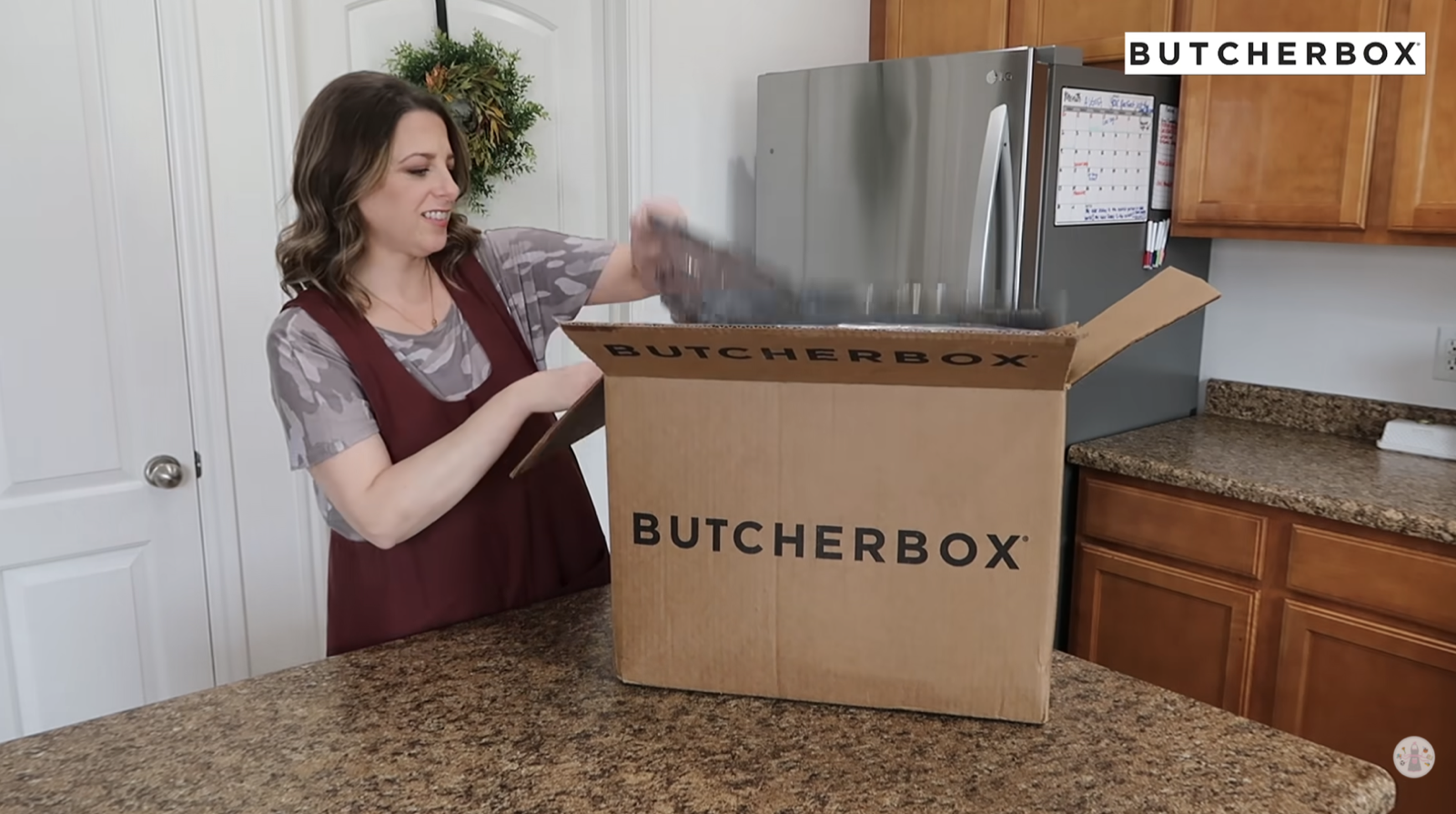
You're buying Trust. Not content, not reach. UGC buys you content. Paid Ads buy you distribution, exactly as much as you pay for and not one impression more. A creator deal buys you a relationship that already exists between a person and their audience, and you're renting it for one video. Most first campaigns fail because somebody ran it like a media buy.
"The secret sauce of YouTube isn't that there's people talking about a thing. The secret sauce of YouTube is that out of all the places that people consume content, there can be more trust made there than anywhere else."
You're hiring the Audience, not the Influencer. My favorite example of this going wrong: a mukbang creator for a calorie tracking app. Perfect on paper. Total disaster, because nobody watching a guy eat 8,000 calories wants to be reminded about counting theirs. Same story with UFC fighters (audience is on the couch with a beer). The one that actually worked was a TikTok dancer with zero fitness content, because that sponsored video was the first time she'd let a long-time audience into her real life.
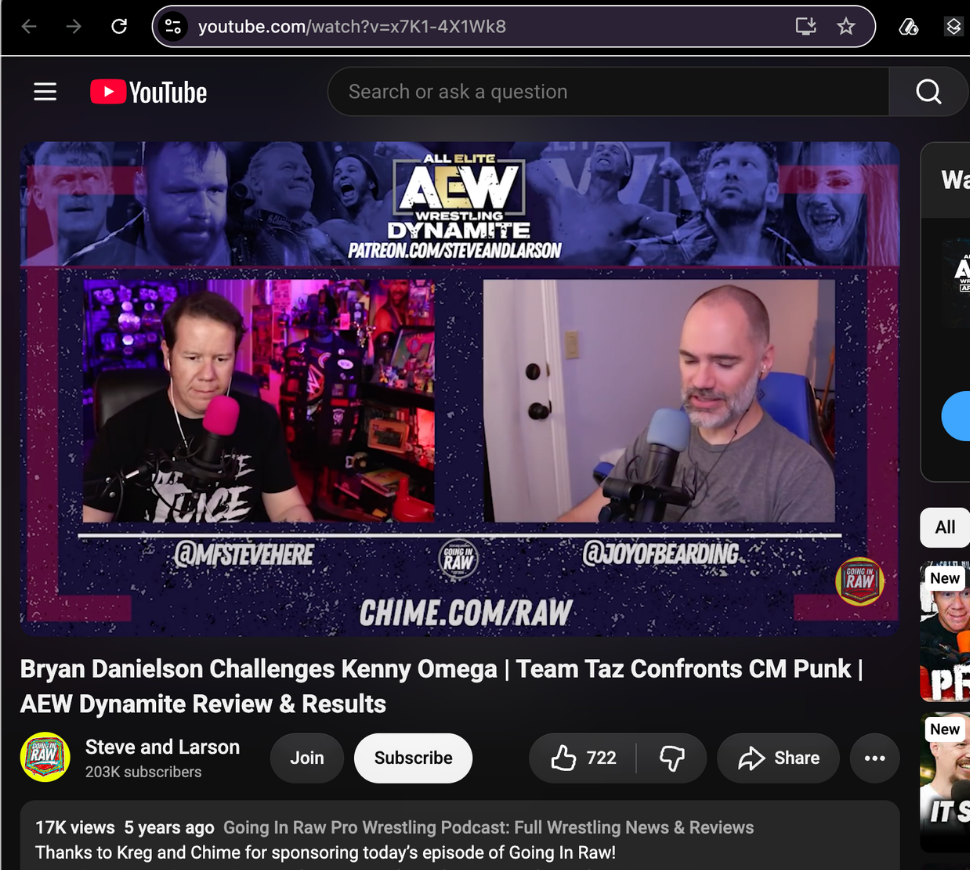
Chime's biggest driver on YouTube isn't finance creators. It's podcasters, gaming channels, and lifestyle creators whose audience trusts them enough to try a new bank. See the full breakdown in our Chime case study.
Followers barely matter. A 15k creator can pull millions of views. A creator with millions of subs can pull 10k. You're paying for the video, not the number next to their name.
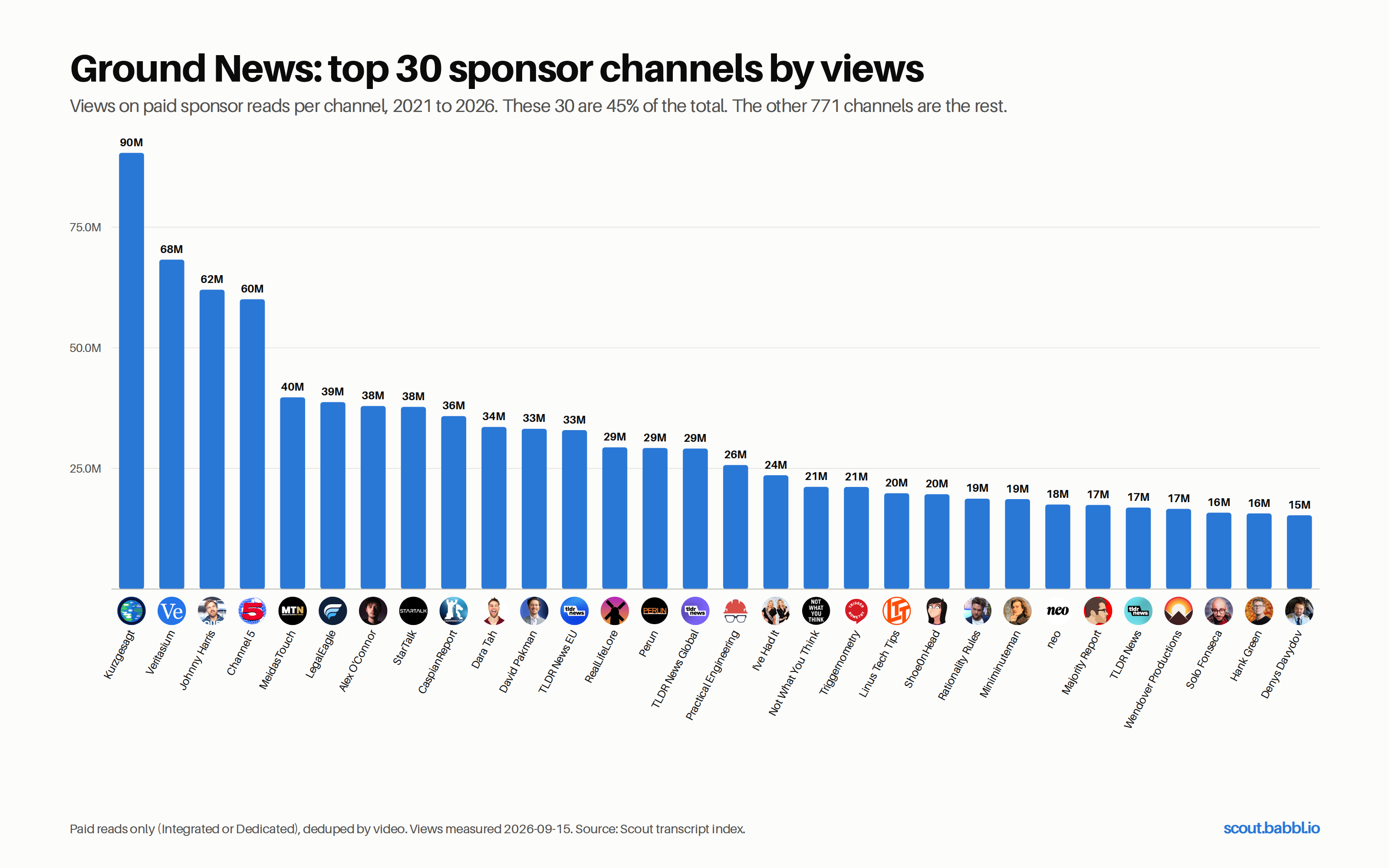
Ground News grew from 100K to 1M+ installs on YouTube sponsorships without a single dominant creator. Kurzgesagt is the #1 name and it's 4% of views. Breadth beats big names. Full breakdown in our Ground News case study.
Is YouTube sponsorship right for your product?
Sponsorships work on products people have to think about. If yours is an impulse buy, a cheaper ad somewhere else will probably beat a creator deal and you should go do that instead.
One question sorts it: What does your customer need to STOP BELIEVING before they buy from you? If the answer is "nothing," you're Low Consideration. Go run ads.
If there's something real in the way (a preconception, a switching cost, a price that needs justifying) then you need someone your customer already trusts to do that arguing for you. That's the whole job of a sponsorship.
Three things push a product into High Consideration:
- Price point (a few hundred dollars and up, automatically)
- Switching cost, and not just money, also habit and setup and learning a new thing
- Belief barriers, the thing people wrongly assume about your category that you have to undo first
How to search for creators: start loose, then react
Your first search is not supposed to be right.
Every tool you've used trains you to believe the opposite. Fill in the filters, hit go, and if the results are bad you assume you filled them in wrong. So you write a longer, more specific query. And it gets worse, because now you're guessing at answers to questions you haven't seen any data for yet.
Scout works the other way. Start loose, look, react. Six moves below, you'll use four of them in the first ten minutes.
Move 1. Describe your buyer, not the creator start loose · when: your first search · prompt: "describe your buyer, not the creator" You don't know what channel you want yet. You do know who buys from you. Say that, in a sentence, the way you'd explain it to somebody new on your team. Best brief we ever got didn't name a single channel. Three kinds of customer, plain English: a high-performance founder type, a parent buying non-toxic stuff for young kids, and an empty-nester in a big house who'd just watched a friend get sick. What each one already buys, roughly where they live. That was it.
"In my head, there's an image of what an art creator looks like, but in these databases the definition kind of varies. And so that gap between what I think and what the database thinks becomes really wide and you're not able to bridge. And then you start thinking in terms of, okay, what does this database think that art probably means. And that's where people kind of drop out."
Move 2. React to the list instead of rewriting your search react, don't reprompt · when: the list feels 60% right · prompt: "these three are right, this one isn't, here's why" You're allowed to REACT instead of re-specify. Most people rewrite the whole prompt when they could just say "more like these two." Gut calls carry more than another paragraph of criteria does, because you're pointing at something real instead of predicting something abstract. Yes / maybe / no is enough, you don't owe anybody a justification. And "this one's wrong, audience skews too young" teaches Scout more in nine words than a rewritten brief does in ninety.
Move 3. Ask for more creators like the ones you liked swipe left and right · when: three to five of them feel right · prompt: "find more like these" Highest-leverage move in the product and almost nobody finds it on their own. The second you can point at a real channel instead of describing a hypothetical one, everything gets better, because a real channel carries a hundred attributes you'd never think to type out.
Move 4. Look up who your competitors already sponsor when: you know a competitor's roster, or you can name one brand in your category doing this well · prompt: "who has [brand] worked with?" Somebody else already paid to figure out which creators work in your category. This one's big enough that it gets its own door, below.
Move 5. Change the subscriber range, not the description resize · when: right people, wrong scale · prompt: "same thing but 50-250k subs" Usually the second or third thing a good operator notices, and they only notice it after seeing a list. People are right, size band is wrong. Either too expensive to test with or too small to move anything.
Move 6. Run one search per audience the more the merrier · when: you sell to more than one kind of person · what to do: start a new chat One chat per vertical beats one giant search, every time. If you're horizontal (a tool three different industries buy) don't try to describe all three at once, you'll get a list that's mediocre for each. If you catch yourself typing "and also" into a prompt, that's a second chat.
2. How Scout Finds YouTube Creators for Your Brand
You describe something, Scout asks you a few questions, you get a Shortlist and a chat box to argue with it.
2.1 How to find YouTube creators manually, and what it costs you
The manual version: search the category on YouTube, watch channels, compare engagement, open ten videos to see who's sponsored them, build a spreadsheet, rank what's left. Then do it again next month because the list is already stale.
Plenty of people do this well. The best ones have built themselves a whole stack out of Sheets scripts, a browser extension for channel stats, and a spreadsheet with a few thousand rows in it. At the top end an agency will have twenty assistants pulling a hundred leads a day each.
Here's the part that actually matters: you have to understand the LOGIC of what you're doing. Automating a process you don't understand just gets you bad output faster. Every step in this guide has a reason behind it, and if you know the reason you can tell when a result is wrong. If you don't, you'll accept a list because it looks like a list. That's how people end up spending real money on channels that were never going to work.
So, honestly:
- Scout does the HOURS. Finds candidates across 100K+ channels and 2M+ brand deals, pulls the numbers, reads Sponsorship History, ranks everything against your brief, gets you emails and rates.
- You do the JUDGMENT. Who's actually worth it. Watch a few videos. Read the comments. Decide whether this person's audience believes them about your kind of product.
That second list is short but it's the part that decides whether the campaign works. Nobody's automated it (us included) and you should be a little suspicious of anyone telling you otherwise.
2.2 What Scout asks you before it searches
Every search asks you a few things about topics, audience, demographics. What you get asked depends on how specific you were to start. Vague opener, more questions. Detailed opener, fewer.
They're not a form. Scout is working out what your customer would type into YouTube, which is a completely different thing from what your brand does.
Scout doesn't look for channels that match your CATEGORY. It looks for the SEARCHES your customers are running, then finds the channels that answer them.
Example. We work with a belt company. Their top creator isn't in men's fashion or grooming, he's a paranormal history guy making hour-long videos. His audience locks in for the full hour and believes what he tells them. No category filter on earth surfaces that channel, and it beats the obvious picks.
2.3 What is a fit score and how is it calculated?
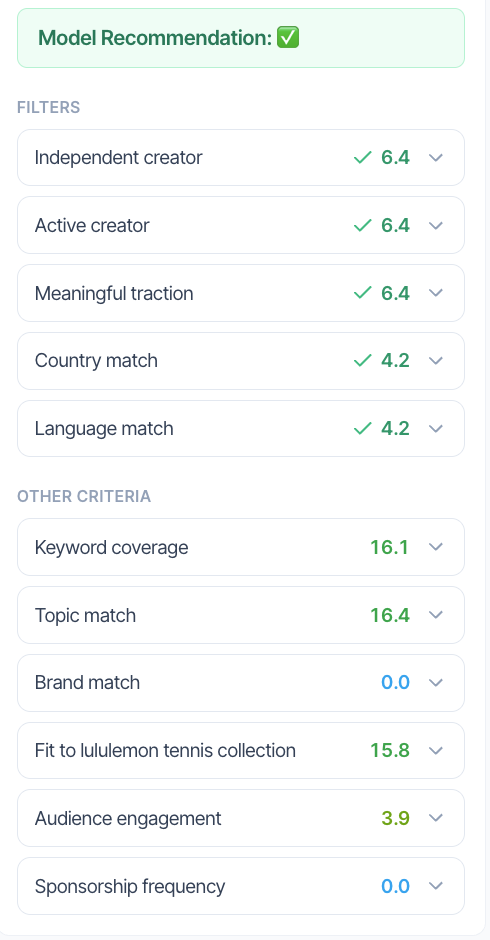
A fit score is a single number from 0 to 100 estimating how likely a channel's audience is to BUY the kind of thing you sell. Not how likely they are to watch. Not how big the channel is. It's a weighted composite of criteria, and every criterion that fed into it shows up in a drawer under the number with its own points and the real value behind it.
A 2M-sub channel can score below a 60k one, and when that happens it's usually right.
Criteria scored on every search
| Criterion | What it checks | Why we bother |
|---|---|---|
| Active Creator | uploaded in the last 90 days | a dormant channel can't run your campaign, and recency also predicts whether they'll even answer an email |
| Independent Creator | a person, not a brand-owned channel | brand channels look exactly like creators in the data and will never take a sponsorship. most common junk result in every other tool |
| Meaningful Traction | average views clears a floor | 200k subs and 400 views a video is not a channel you can buy |
Criteria your search adds
| Criterion | What it checks |
|---|---|
| Country Match | where the channel's based, when you've asked for a region |
| Language Match | what language the content is in |
| Keyword Coverage | how much of what you asked about this channel actually covers, weighted by how often and how recently. expands to show you the exact videos |
| Topic Match | relevance graded per video then rolled up. density, breadth and recency, not whether something got mentioned once |
| Brand Match | whether they've actually run a deal with a brand you named, with source videos as proof |
| Average Views | where they land against everyone else in this search, not against YouTube as a whole |
| Recommendation | holistic read of the channel against your brief, after everything else is counted |
Ask for something specific and Scout adds a criterion for it. Search for creators who've run sponsorships in your category, you get a Sponsorship Frequency row. Ask about audience quality, you get an Engagement row.
Why the same score means different things
The score always adds up to 100. Which means the more SPECIFIC your brief, the more the score is measuring what you actually asked for.
Run a bare search and those three always-on criteria carry most of the weight, roughly a sixth each. Add keywords and a named competitor and they collapse to under a tenth each, while Keyword Coverage alone can take a quarter of the score.
What that means in practice: a 90 on a vague search and a 90 on a sharp one are not the same number. First one says "this is a real, healthy channel." Second says "this is a real, healthy channel that covers your exact topic and has run deals like yours." Both useful, very different.
Why one mention doesn't make a creator relevant
Early on we ran a search for football channels sponsored by a sports betting brand. Near the top of the results: a cooking channel. Turned out five years back she'd posted a recipe video for a Super Bowl casserole. One video, one mention, ranked alongside an actual football podcast.
That's what Topic Match is defending against. Scout grades how much of a channel is about a thing, how recently, across how many videos. One mention is not a match.
What counts as a good fit score
Great Fit and Moderate Fit are the bands you'll see. Anything Scout shows you has already cleared an exclusion bar upstream, so a 60 isn't a failing grade, it just means real but unremarkable against this particular brief.
If you're seeing fewer than about ten in the top two bands, widen the brief or ask Scout to go find new channels.
2.4 What is audience trust and why does it predict sales?
Audience trust is whether a creator's viewers believe that creator's judgment enough to act on it. It's the variable that explains why two channels with the same view count, same category, same brief and same call to action can differ in sales by a hundred times. It's also the thing this entire industry still doesn't price.
Trust is a Point of View you can follow. Not agreement. Not likability. Whether you can see how this person thinks.
"You have a point of view, and I don't necessarily agree with everything in your point of view, but I can at least understand it. Or the other version is maybe your point of view is less pronounced, but at least I understand how your mind is stepping through a problem."
"There's a difference between being opinionated and having a point of view."
Liking somebody isn't trusting them. This distinction kills more campaigns than anything else on this page:
"I like The Simpsons. So I have an affective trust for whoever's making it, but that doesn't mean I want to buy products from them."
Charismatic, entertaining, enormous, and completely unable to sell you something:
"They're probably charismatic. They're doing some neat things. They've built an audience, but they're really chasing the next big video, and probably aren't going too deep on anything. Chasing almost like the entertainment value of it. And that's not what builds trust."
It's about MINDSET, not audience. Same person is on YouTube, TikTok and Netflix. What changes is what they're there to do.
"It's the mindset they're in when they're there. That's the whole rub."
Case study: two channels, same brief, 100x difference in sales
Two channels. Same brief, same product, same call to action, same discount code, near-identical view counts.
One was a science education channel. Endemic on paper, genuinely obvious fit, the kind of thing you'd greenlight without thinking twice. The other was a commentary channel whose host talks about culture and gender politics and has no topical connection to the product whatsoever.
The commentary channel sold over 1,400 units. The science channel sold 12. That deal cost about $15,000 and returned about $1,200.
"It's not like, oh, she was 12% better. No, it was a hundred times better."
"I don't think people realize how gnarly it is when it misses... And if you're a small brand, or maybe even a big brand but with a small YouTube budget because you're just starting in the channel, you get a couple of those early on, you're done."
Same failure somewhere completely different: a rainforest conservation nonprofit sponsored a political commentator who literally interviewed their founder on camera. Maximum topical relevance. Did terribly. His audience doesn't come to him for that, and no amount of on-topic-ness manufactures a reason to believe.
Trust vs authority
We all call it "relevance." It's really two separate things.
TRUST is whether this audience believes this person's judgment. AUTHORITY is whether this person has standing to talk about your specific product.
You need Trust. Authority is a bonus on top, and it lets a creator outperform their trust score (a machinist reviewing a precision-made tool has both). But Trust is the load-bearing one.
"If there's no trust, no value."
Signals that an audience trusts a creator
There's no metric for this, which is exactly why it's still available to you. But it leaves fingerprints:
- Consistent view counts, meaning a floor they hit every time, not one viral spike
- Comment-to-view ratio read against the channel's own size. "that trust has to show up somewhere"
- Real comments. questions, disagreements, people replying to each other. not emoji
- Topic selectivity. are they picking subjects they care about or chasing whatever's trending? trend-chasing is the clearest sign an audience showed up to be entertained
- Willingness to go deep. a creator who'll spend twenty minutes complicating something has an audience that came to learn, and that audience buys
None of which replaces watching a video. Open one. If you want to leave in the first two minutes, so does their audience.
Why outsourced ad reads kill performance
Ad reads handed off to an agency or an intern.
"There's another really science-based show and then they come back with a script and it's like, 'Do you want to elevate your shave game?' I'm like, what are you talking about? I'm not working with you because you're an influencer. I'm working with you because you're nerds. Talk like nerds to your nerdy audience."
"If I could ever get a big enough microphone, I would plead, I would get on my knees and beg to the creator community to stop doing this. If you want your brand deals to work and be more authentic and be less cringy to your audience, do it yourself."
You paid for the Trust, then somebody else read the script and you didn't get it. Put one line in your brief asking them to write and voice it themselves. Most creators are relieved you asked.
2.5 What you get back
After Plan Mode you get your Shortlist and a chat box. The chat is where the real work happens, not the search bar. That's section 1.

For a deeper walkthrough of how a live search plays out, see the replace-spreadsheets-with-scout demo.
3. How to Start a Creator Search: Four Ways In
Rule #1: SHORT prompts beat LONG prompts. Plan Mode asks the questions needed to get you to the right creator. Describe every detail up front and you're just guessing at answers before you've seen a single result. One sentence is a perfectly fine place to start.
Build your pool LOOSE. You're trying to get from 50+ down to ~10 across a few rounds of refining, not to nail it on the first search. If your first list comes back short and perfect, you searched too narrow.
Four ways in. Pick the one that matches what you already know and run it end to end. Prefer to poke at the underlying data first? Find YouTube influencers → is a free, no-signup surface into the same 100K-channel index.
3.1 Start from your website URL
for: you haven't run YouTube before, wide audience and buyer
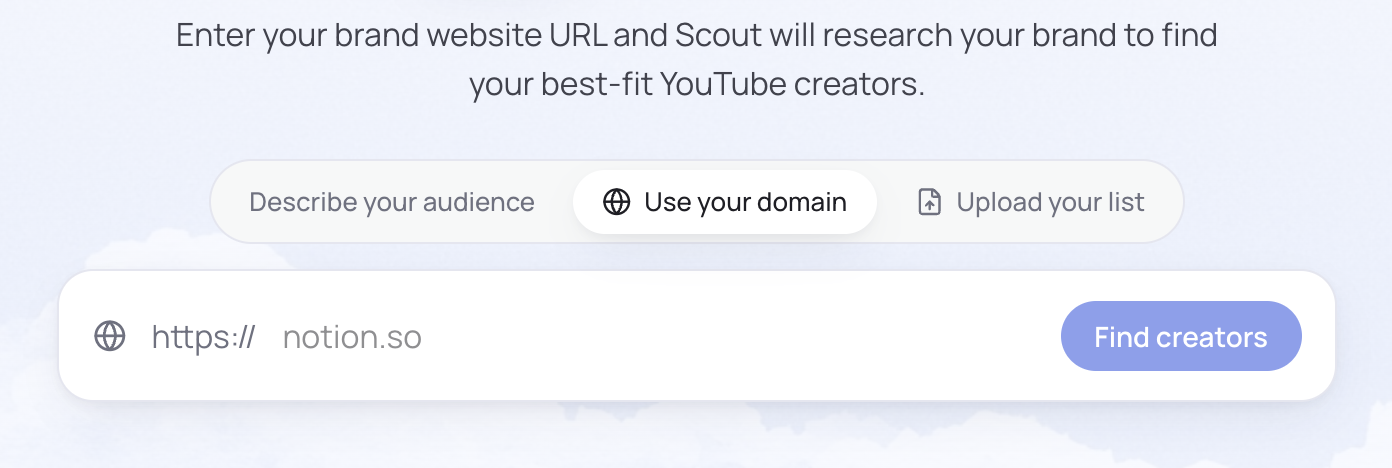
Copy your website link, paste it in the chat bar. Scout reads your site, figures out what you sell and who buys it, asks a couple questions to confirm, hands you a list.
That first list isn't the deliverable. It's where you start shaping your taste, and you should expect to throw half of it away. Try it: paste your URL into Scout →
Refining from here. You don't know exactly what you want yet, so plan on a few rounds:
- Sort by Fit Score. Open the drawer on your top five and look at which criteria are carrying those scores. If it's mostly the base three, your brief isn't specific enough yet.
- Filter on what matters for this campaign. Size band, average views, country, language.
- Run the six moves from section 1. React on the good ones, ask for lookalikes, resize if the band's off.
- Too broad? Add criteria one or two at a time, so you can tell which one changed the list. Too narrow? Drop your most restrictive filter first, usually subscriber range or country.
- When the list stops SURPRISING you, you're done. That's the signal, not a number.
Then enrich for emails and rates on the 10-20 you're keeping. Pulling a creator costs one credit and revealing a verified contact costs a little more, here's how credits work →
Enrich LAST. Enriching a list you're still shaping just spends the effort on channels you're about to cut.
3.2 Start by describing your customer
for: you know your audience and your customer
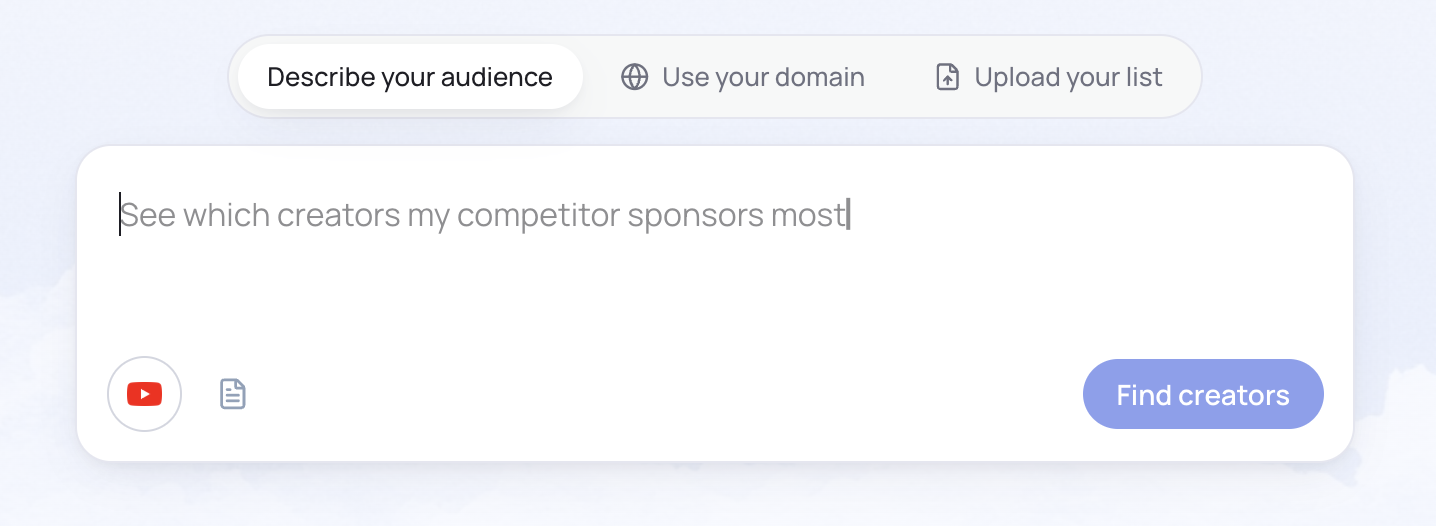
Say you're looking for "gaming creators under 200k subs who've talked about Roblox but haven't done sponsorships with Turtle Beach." This is where you go to find them — see the gaming YouTuber brands we've indexed for reference.
Do start a search phrased like:
- "Find me creators who are a fit for [brand]"
- "Find me creators who talk about [x product/category]"
- "Find me creators whose audience is [description of your customer]"
Don't open with a paragraph listing eleven filters you haven't tested yet.
Then Scout asks a few questions.
Criteria you can layer on once you've seen results. Once you've seen a first list you can add whatever you actually know about your audience. These work far better as REFINEMENTS than as opening conditions:
- country or language
- over/under x subscribers
- average views above x
- has (or hasn't) run sponsorships with a named brand
- has run sponsorships in a category
- audience age range
- estimated cost under x
- timeframe, e.g. only channels active in the last 90 days
Every one you add gets its own row in the Fit Score and pulls weight toward what you asked for. Which is why they're worth adding, and also why adding all of them at once gives you a score that's measuring eleven things and prioritizing none.
If Scout can't find enough matches it keeps looking in the background and emails you when it has more.
Refining and enriching from here follows the same five rounds as 3.1. The difference is you're steering from the first search instead of the second, so you'll usually land it in fewer passes.
3.3 Start from creators you've worked with
for: you've worked with creators before
Drop in a csv of channel urls. You already know these channels, so the job is filling gaps rather than discovery:
- Emails and current rates on everyone you uploaded, so you know what to budget before you ask
- Lookalikes, run off your best performers only. The whole list includes the ones that didn't work, and lookalikes off a mediocre seed give you more mediocre
- Sponsorship History on the roster you already have. If one of your creators picked up a competitor since you last worked together, you want to know that before you email
- Resize or redirect. The same kind of creator for a different audience, or similar channels at a different size
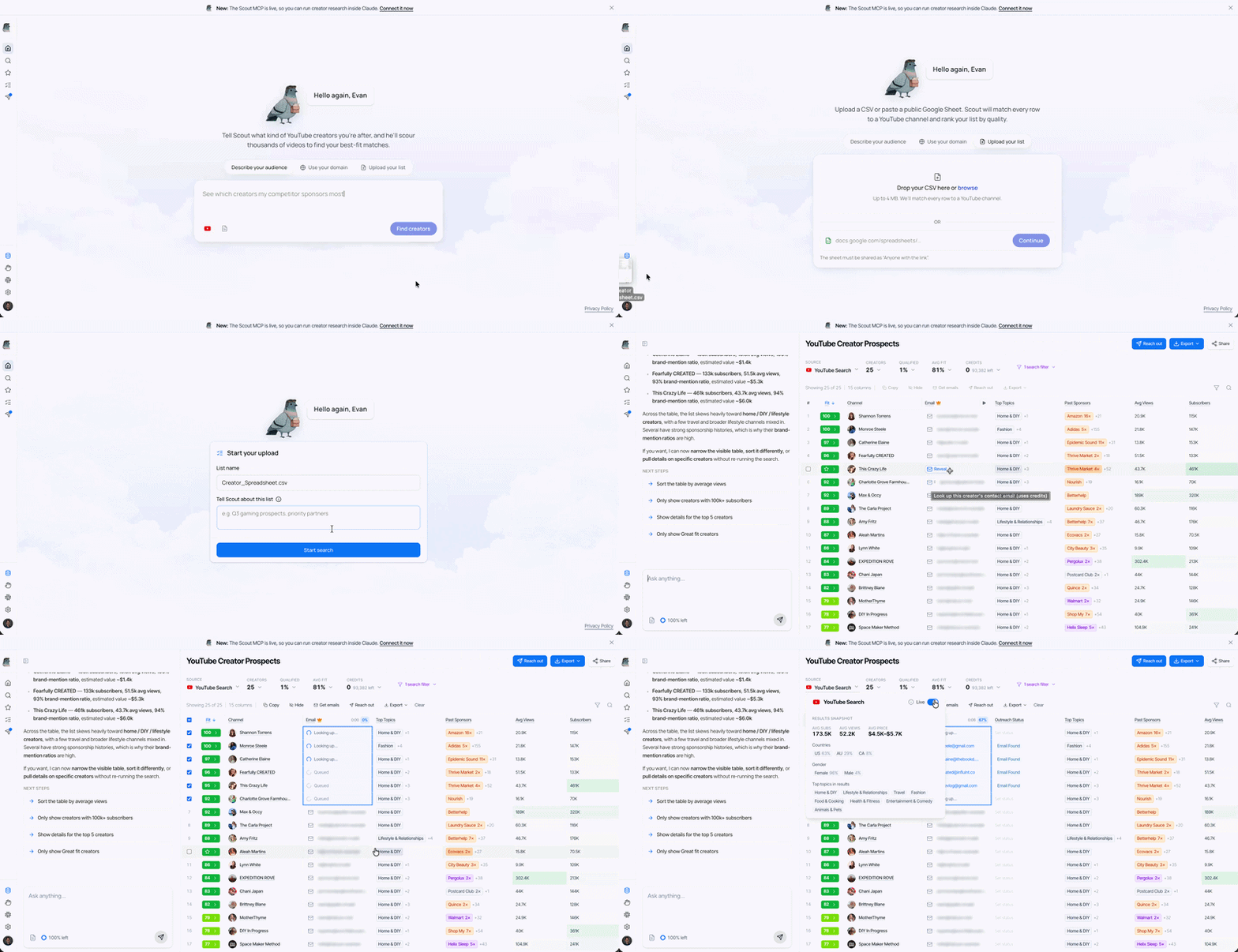
Then compare the lookalikes back against the originals on whatever made the originals work. That's the check that stops a growing list from drifting away from what you liked in the first place.
Best version of this by a mile: upload the creators who actually worked for you, ask for more like them. You've been running the react-don't-reprompt loop by hand for years. This is just handing over the results.
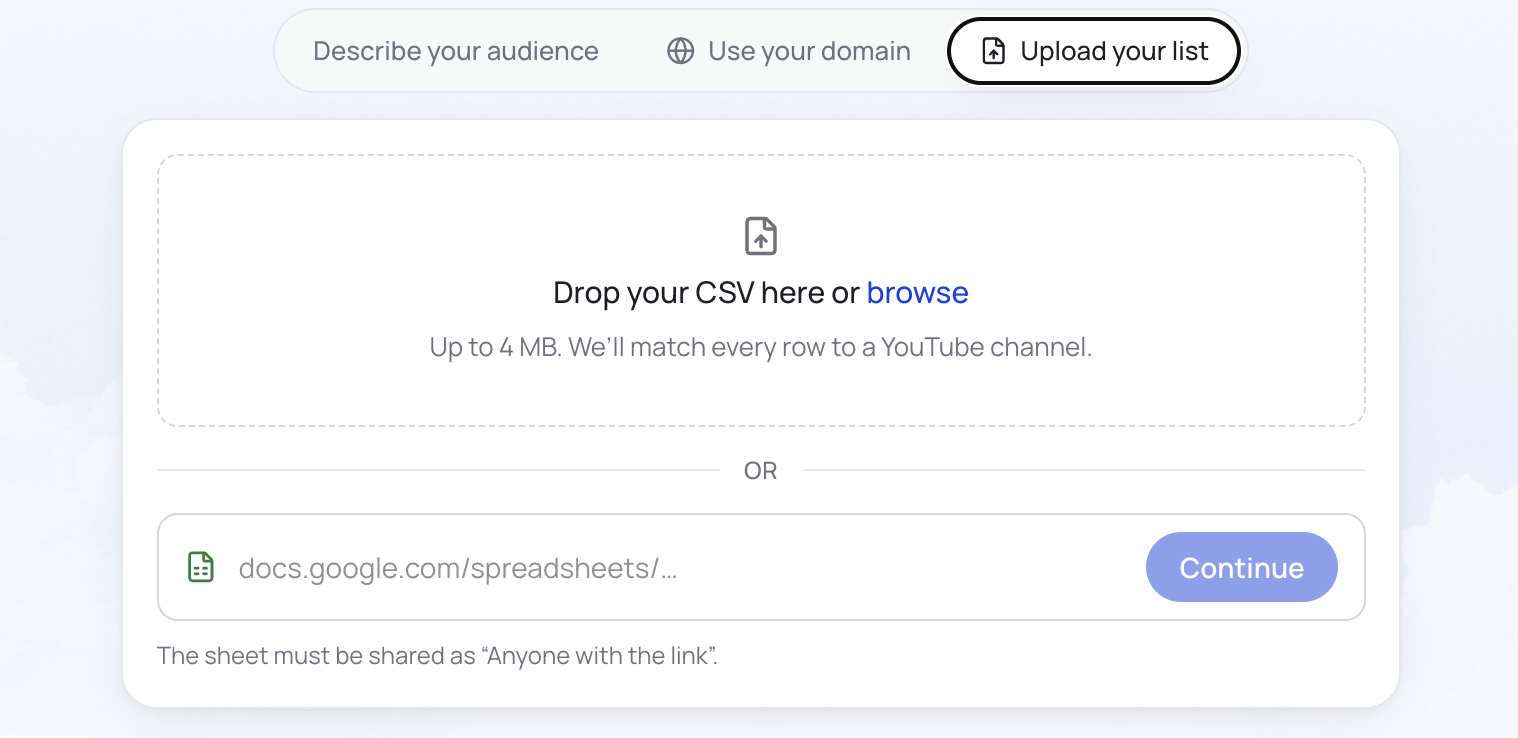
3.4 Start from a competitor's roster
START HERE if you only run one search. Fastest way to find out whether YouTube works for you is to find out who's already PAYING for it in your category. Our Chime case study and Ground News case study are two full worked examples of exactly this move.
Ask for it like this:
- "Find me creators who have been sponsored by [brand]"
- "Find me creators who have mentioned [product] in the last year" (in a narrow enough niche a mention is usually either a paid deal or a close organic match)
- "Find me creators who have run sponsorships in [category]"
Two variables worth playing with:
Timeframe, past vs present. "Talk about" and "have talked about" give you different lists. The split usually falls along category vs product, or topical interest vs sponsorship signal.
Category vs named competitor. Scout researches whatever brands you enter, so it'll either surface whoever's running the most (or best) sponsorships in your niche, or stick to the ones you name. Name them when you're fighting for the same slot.
Then read what comes back as SIGNAL:
- if a type of creator worked for your competitor, decent chance it works for you
- if a creator ran sponsorships in your category for one month and then never again, decent chance it didn't perform
- if a creator's run 10+ deals with your competitor they're probably locked up, but they're a great lookalike seed
Why this is the one to run first. Two things happen at once when you see a competitor's roster, and they're the two things that get a campaign approved internally.
It PROVES the channel works. Somebody in your category, with a budget and a finance team, decided YouTube was worth spending on. Repeatedly. That's a better argument than any case study because it's your category and your price point.
And it tells you what you've been MISSING. The conversation stops being "should we try YouTube" and becomes "we're the only ones in this category who aren't." Much shorter conversation.
It's also just the cheapest search you'll ever run. Every creator on that list represents a brief somebody wrote, a rate somebody negotiated, and a result somebody measured. You get the shortlist without the tuition.
Run it even if you already know who you want. Takes two minutes, and it either confirms your instinct or shows you a segment you'd written off.
Here the Sponsorship History is the enrichment. Read it before you pull a single email:
- How many deals has each creator run in your category, over what period? one-and-done is a warning. five over two years is a channel that converts
- Who else has sponsored them? four brands in your category means either excellent or saturated, and you can't tell which without looking at how long each one stuck around
- When did it stop? ran your competitor monthly and then stopped six months ago = either available or burned. one email finds out which
- Paid or affiliate? affiliate-only means they'll take performance risk, which usually means they'll take a lower flat rate too
- What did the integration actually look like? open one. a creator who reads a script badly for your competitor will read it badly for you
Then enrich for emails on whatever passed, plus the lookalikes you generated off them.
4. How to Evaluate a YouTube Creator Before You Pay Them
The list is a QUESTION, not an answer. Read it before you judge it.
Almost everybody's first instinct is to sort by subscribers and start at the top. That column is the least predictive thing on the page. The four below are what actually decide.
4.1 Which creator metrics actually predict performance
Average views and the views-to-subscribers ratio
Average views on its own is a trap, because one video that popped off drags the whole number up.
The careful read: take the 10 worst-performing videos out of their last 100 and average those. That's your floor. Price the deal off the floor and everything above it is upside.
"I care about what I call the worst case scenario average. If I set my CPM based on that worst performing video, basically that's guaranteed to be at least very profitable."
The fast read: average views divided by subscribers. One number, tells you whether the audience is ALIVE or HISTORICAL.
| Views ÷ subs | What it means |
|---|---|
| under 5% | audience has moved on. big number, dead channel. most expensive mistake on this page |
| 5-10% | normal. fine, not exciting. price accordingly |
| 10-30% | healthy. people are showing up for the new thing, not just subscribed four years ago |
| over 30% | algorithm is pushing them past their own sub base. usually underpriced, because they price off subs and get paid off views |
A real pair from the same niche: one channel has 25k subs and ~78k average views. Another has 302k subs and ~10k average views. The first is about a twelfth the size and worth roughly six times as much. Sort by subscribers and you buy the wrong one, and you never find out.
Audience country vs creator country
Where the creator lives doesn't matter. Where their viewers live does, and the two come apart constantly. Loads of channels are filmed in one country and watched almost entirely in another.
"I don't care what country they're from. I care what country their audience is from."
If you can't ship there the view is worth nothing.
Title and thumbnail fit
Ten seconds, real signal. Scroll their last dozen uploads and ask whether your product would look at home next to those titles.
You're checking TONE (curiosity titles vs outrage titles vs teaching titles) and CONSISTENCY (does this channel have a shape, or does it chase whatever worked last month). Trend-chasing is the clearest sign the audience is there to be entertained, and entertained audiences don't buy considered products.
Talking head vs faceless
Talking head, faceless, long-form vs shorts, scripted vs rambling. Changes what the integration feels like and what you should pay for it.
Faceless channels can absolutely work, the relationship is just weaker, so pay less. Somewhere around two thirds of what you'd pay for the same reach with a face and a voice attached is a fair starting point.
Long-form beats short-form for anything considered. An hour of attention builds something 30 seconds can't.
4.2 Which creator metrics you can ignore
Days since upload. Scout already gates on activity, so beyond "are they still posting" this tells you nothing.
Creator country. See above.
Subscriber count on its own. The number everybody looks at first and the one that predicts least. It's a record of how many people once clicked a button. Average views is a record of who showed up this month.
Total channel views. Mostly measures how old the channel is.
4.3 How to tell a good shortlist from a bad one
A bad list looks topically correct and is audience-wrong. Four tells:
Short-form creators mixed in when you wanted long-form. Different businesses, different audiences, different economics.
"I break down creators into two categories. When I say YouTube, I'm looking for long form creators. If I'm going short form, I'm not looking at YouTube shorts."
Everything's the same size. Usually means the search keyed on a subscriber range instead of on your audience. Real audience-driven results come back with a SPREAD.
The channels are about your CATEGORY rather than for your CUSTOMER. Easiest tell here: could you have written this list yourself in ten minutes? If nothing on it surprises you, the search matched your brand's keywords instead of your customer's searches.
One-mention matches. Open the Keyword Coverage drawer. If a channel's on the list off one video from three years ago, that's the casserole problem from 2.3.
Any of those and you shouldn't rewrite the prompt. Go back to Move 2 and REACT.
4.4 Can you see a creator's audience demographics?
Not directly, and this trips up almost every brand running its first campaign. YouTube shows audience age, gender and location only to the channel owner in their own Studio analytics. There is no public view of it, on any channel, ever.
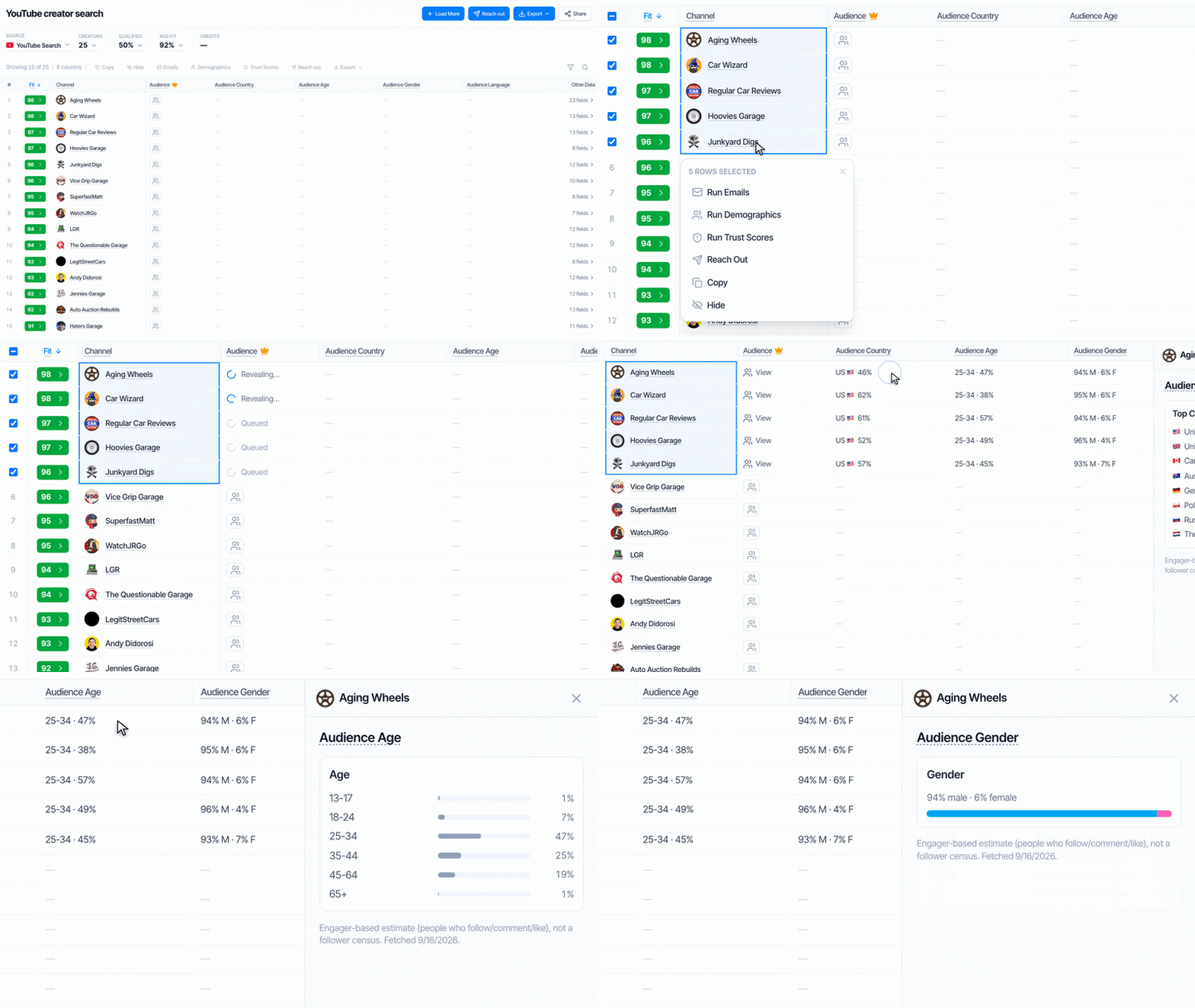
So here's what's actually available, in order of cost:
Free, and you can do it right now. Read the comments and infer. Look at what else the creator promotes and who those products are for. Check which countries their language and references point at. Watch two minutes and ask who this is being made for. Crude, but it catches the obvious mismatches, and the obvious mismatches are most of them.
Free, but you have to ask. Request a screenshot of their Studio analytics during the negotiation. Most professional creators have a media kit with this in it already and will send it without blinking. If they refuse or stall, that's information too.
Paid. Third-party tools estimate demographics from panel data and modelling. They're directionally useful and they are estimates, so don't treat them as ground truth. Scout's advanced creator stats show a modelled read alongside the free signals so you can triangulate.
The honest sequence: use free signals to build your shortlist, then ask for real analytics before money changes hands. Paying for demographic estimates on 60 candidates is the expensive way to do what a screenshot request does for free on the 8 that matter.
4.5 What to check before you shortlist a creator
Pick your top five and open a video for each. Not the trailer, not the most-viewed. A normal recent upload.
- watch two minutes, note the moment you want to leave
- scroll the comments. are people talking to the creator, to each other, or just posting emoji
- find a past sponsorship and watch how they handled it. own words, or a script somebody sent them?
Ten minutes total. Best ten minutes in the whole process, and the one part no tool does for you.
5. How to Read a Creator's Sponsorship History
Most interesting column on the page and the one people skip. It's the only one that tells you what somebody else already learned by SPENDING MONEY.
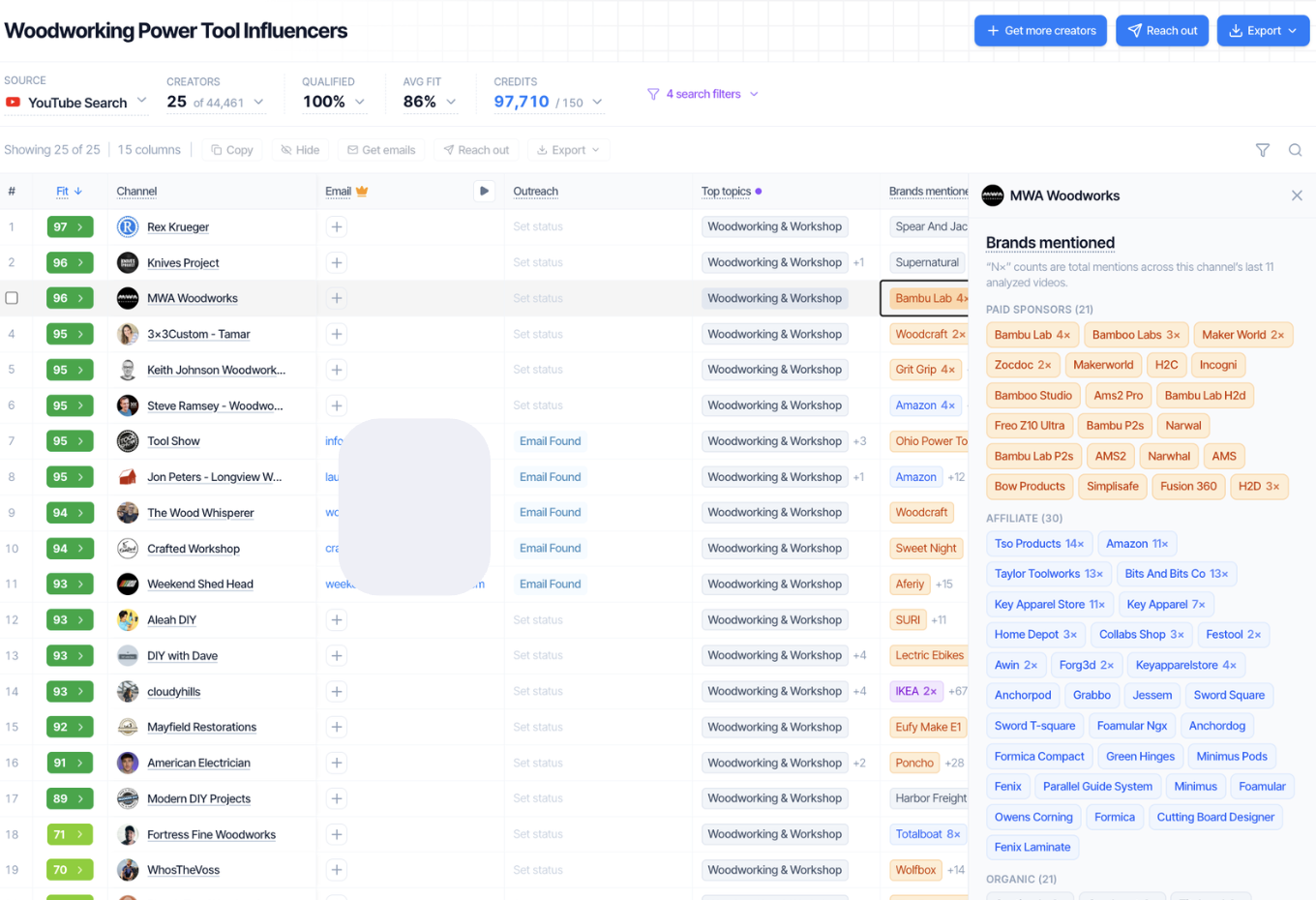
5.1 Why repeat sponsors are the strongest signal
Somebody paid twice. Nobody pays twice for a video that didn't work.
Sounds obvious, almost nobody uses it. A creator with three deals from the same brand over eighteen months has been measured, by a team with attribution, and KEPT. That's a better endorsement than anything else on the page.
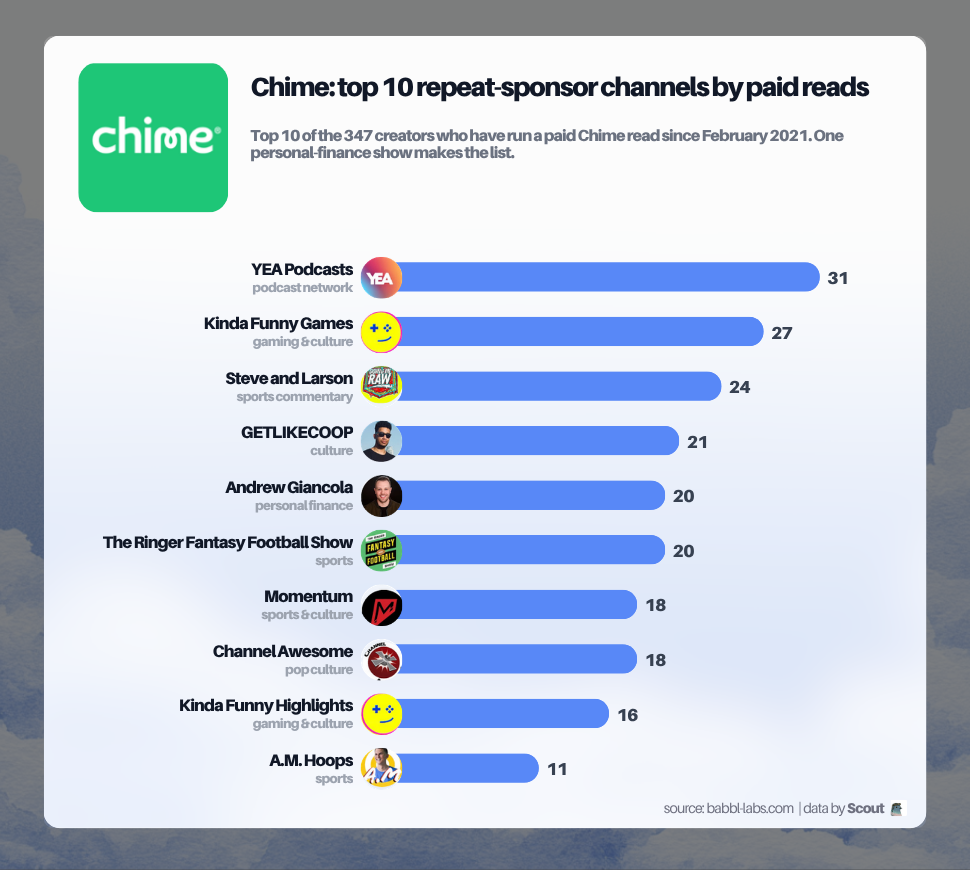
Chime's top ten repeat channels above all cleared dozens of paid reads over multiple years. That kind of repetition is the clearest single signal a channel converts. See the full read in our Chime case study.
Rough read on the counts:
| What you see | What it means |
|---|---|
| 1 deal, a while back | a test that probably failed |
| 2-3 with one brand | working. good sign for you |
| 5+ with one brand | working really well, and probably contracted. lookalike seed rather than a target |
| lots of deals, lots of brands, all one-offs | this creator sells inventory. nothing repeats. careful |
5.2 What it means when a creator stops working with a brand
"Let's say I was doing a calorie tracking app. If I see that they worked for MyFitnessPal and I'm trying to get them for Cal AI, it's always hard to know: do I want the person that made a video for MyFitnessPal or not? Because why aren't they still making videos for MyFitnessPal? If we find a creator and they're profitable, we are not letting them go no matter what. So if they're not still creating content for that brand, that could be a red flag."
The logic there is airtight and worth keeping in your head: profitable creators don't get dropped. So a gap means one of three things.
It didn't convert (genuine red flag). Or the brand cut the whole channel, or whoever ran it left (nothing to do with the creator). Or the creator turned it down and moved on, which is often a good sign about them.
You can't tell which from the data. You CAN tell from one email. Ask them straight out what they've run in your category and how it went. The ones who answer honestly are the ones worth working with anyway.
5.3 Paid integration vs affiliate
Different levels of commitment, different information.
A Paid Integration means a brand was confident enough to pay upfront. Tells you the creator can command a rate and somebody's already vetted them.
Affiliate Only means the creator took the performance risk. Sometimes that's a creator who couldn't get a flat fee. Often it's a creator who genuinely BELIEVES in the product, which is the most valuable thing in this whole section.
Scout separates the two, read them differently.
Quick note on structure while we're here: pure affiliate deals are tempting because there's no upfront spend, but insisting on them cuts out something like 90% of the creators in the market. Most programs that work are a BLEND.
5.4 How many sponsorships in your category is too many
Four sponsorships in your exact category in the last year means their audience has heard this pitch four times. Not automatically disqualifying, some audiences convert on the fifth, but it should change what you pay and what you ask for.
Ask for a category exclusivity window. 30-90 days is normal and costs less than you'd think.
5.5 What to look for in their past sponsored videos
Most useful two minutes available. You find out whether they voice their own reads, whether they can make a transition feel natural, how long they actually spend on it, and whether they've obviously USED the product.
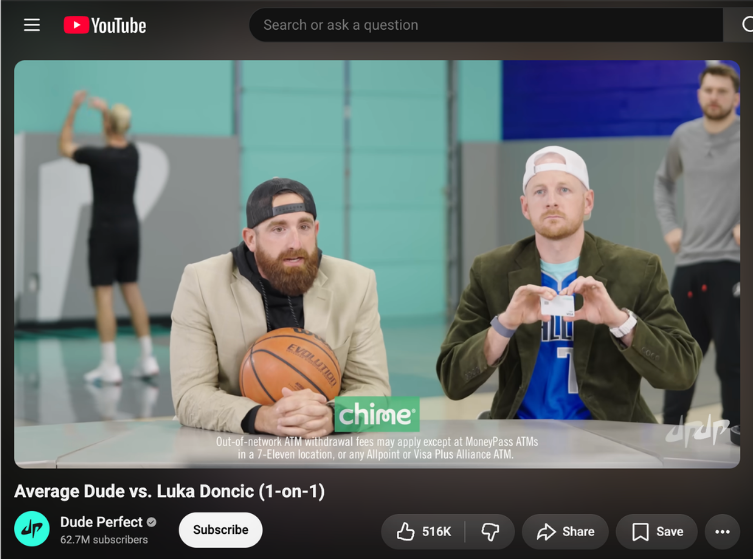
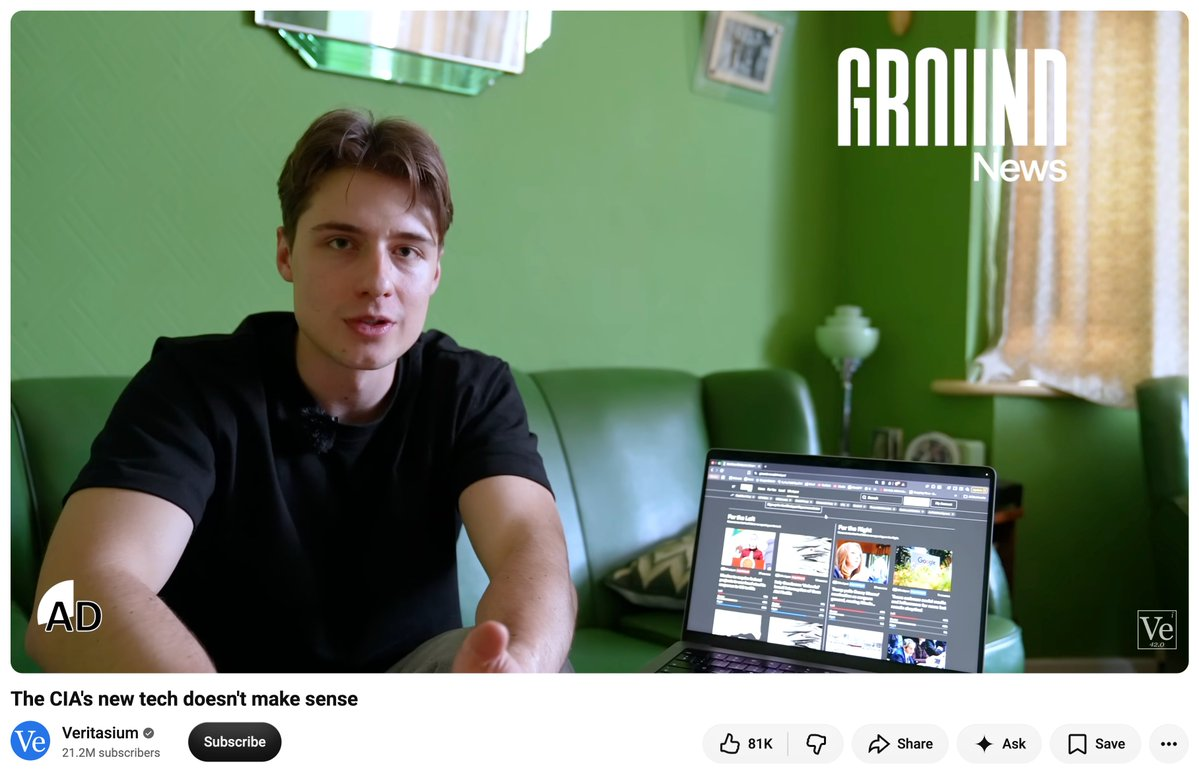
Two very different brands, same lesson: the read that works is the one delivered in the creator's own voice, integrated into the video shape their audience already shows up for.
If a past sponsor's product is still visibly on their desk six videos later, that's your person.
6. How to Build a Creator Shortlist
You've got 40-60. You want 8-12, so you can message 10-20 and sign 2-4.
6.1 The 20-second creator test
Three questions per creator, then move on.
1. Views, not followers. The baseline, not the one that went viral.
2. The comment section. Real questions, real arguments, people replying to each other. Not emoji spam. Cheapest proof of a real audience there is.
3. Could you imagine being FRIENDS with this person? Sounds soft, isn't. The parasocial relationship is the thing you're renting. If it's not there for you in 20 seconds it's probably not there for their audience either.
Still deliberating after 20 seconds? That's a no. The deliberation IS the signal, a yes feels like a yes immediately.
Then layer on section 4: audience country, title and thumbnail fit, format.
6.2 How many YouTube creators should you start with?
Five to ten creators live, which means messaging 10-20. Fewer than five and you can't separate a bad creator from a bad audience, so a failed test teaches you nothing. More than ten and you've spent the budget before the first video is up.
Those numbers matter more than they look, because they're what decides whether you LEARN anything.
Run two creators, both flop, and you have no idea whether you picked wrong or whether the entire segment doesn't want your product. You'll either kill a niche that would've worked or double down on one that never will, and both are expensive.
On the messaging ratio: expect roughly a third to reply, and fewer than that to land on terms you like. Want 5 live, message 10-20.
Budget shape for a first test: spread it. Five deals at $1,000 teaches you way more than one at $5,000, because you get five data points and five chances to find the outlier. The single big swing gives you one number and no way to interpret it. Once something works the math flips and you CONCENTRATE spend on the winner. But not on test one.
Ground News is the biggest working example of this. Their first year on YouTube was 76 reads across 38 channels, most of them small political shows — testing, not swinging. Once they knew the pattern they scaled to 4,579 reads across 801 creators, and the "big names" (Kurzgesagt, Veritasium, Johnny Harris) only showed up in year three, after three years of testing had told them what worked. Full breakdown →
6.3 When to run a separate search
One chat per vertical. If you're typing "and also" into a prompt, that's a second chat.
Why it matters more than it sounds: the Fit Score renormalizes around whatever you've asked for. Describe two different customers in one brief and every criterion gets diluted, so the score is averaging relevance across two audiences and precisely fitting neither. You end up with channels that are 60% right for both instead of 95% right for one.
Split when: you sell to more than one industry or role, you're running more than one brand or product line, you're testing more than one geography or language, or you want both a competitor-roster search and a topic search (they want different briefs).
Keep in one chat: everything about a single audience. Refining, resizing, lookalikes, filtering. That conversation is where Scout ACCUMULATES what you've taught it, and starting over throws that away.
Name your chats after the AUDIENCE, not the brand. In three weeks you won't remember which was which.
6.4 How to avoid contacting the same creators twice
Real problem, and nobody in this category has properly solved it:
"I submit that prompt, I get all those leads, I export the leads, I reach out to the leads, but then when I go back to the well, how do I make sure that it's not the same leads?"
Run a similar search next month and you'll see a lot of the same channels, because they're still the best matches. Which is the system working correctly and also completely useless to you.
What to do about it:
Export every time, even when you don't need to. Your export history is your contacted list, nothing else is keeping it.
Upload your last export at the start of the next search. Scout can work around what you've already touched instead of handing it back.
Keep a status on every name. Contacted / replied / passed / signed / declined. "Declined" isn't "never again," it's "not this quarter," and knowing that difference in six months is worth more than the original list was.
Change one AXIS, not the query. Same brand, different customer segment. Or same segment, different size band. Rerunning the same brief with different adjectives just returns the same channels in a different order.
Ask Scout to go find new ones. When a search stops producing anything you haven't seen, that's the moment to have it crawl past what's already indexed.
Treat a NO as a lookalike seed. A creator who declines still tells you your brief was right. Ask for more like them.
7. How to Reach Out to Creators
Their inbox is full and half of what lands in it looks like a scam. LEGITIMACY is the game here, not volume.
"As a creator, you're going to just get outreach randomly all the time, and it's already a problem. The creators are inundated all the time by different brands and different platforms reaching out to them, and they ignore half of them because they have never heard of them before, or they feel like it might be a little scammy."
7.1 How to send creator outreach in Scout
This mirrors what you'll actually do in the dashboard, in order.
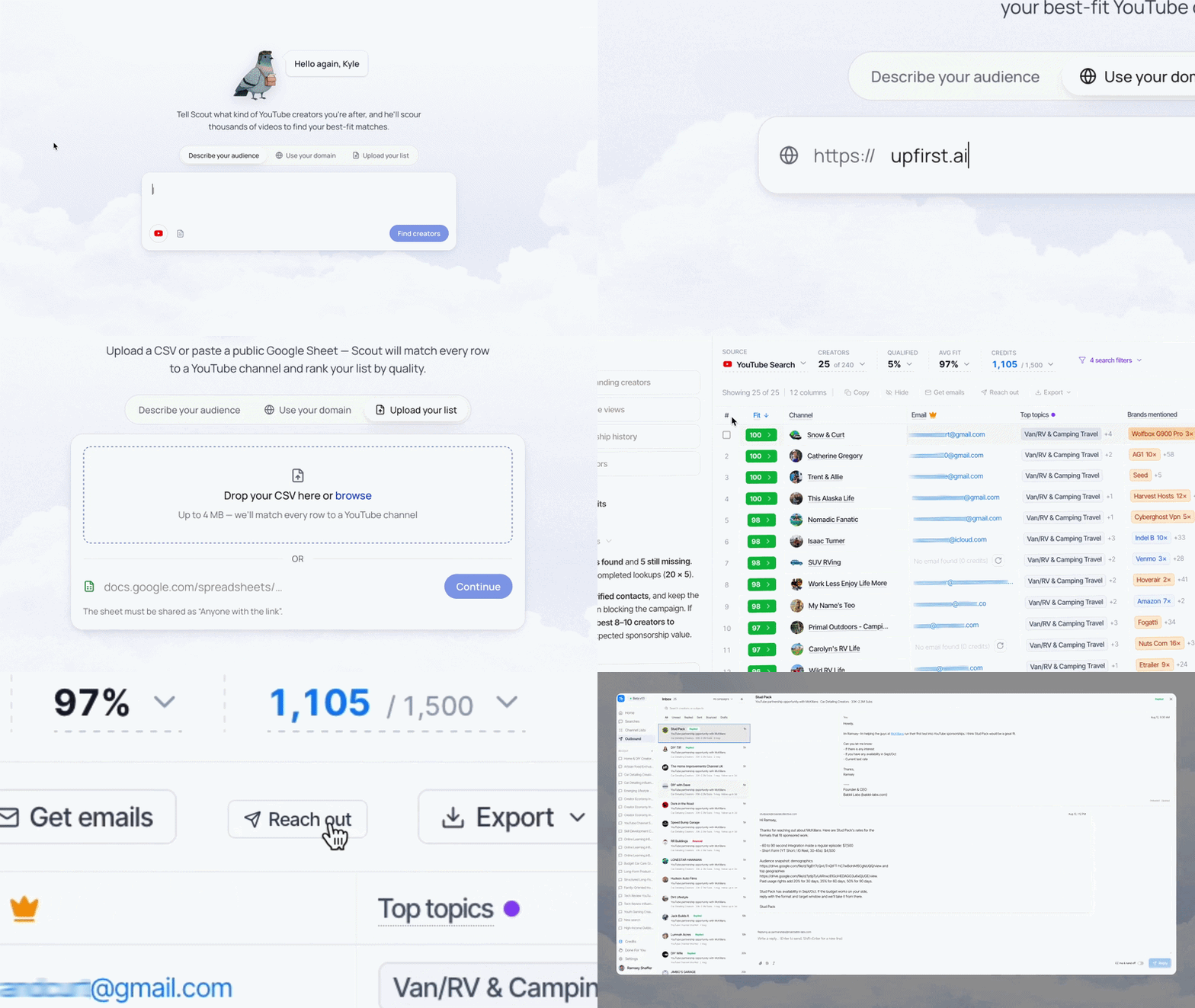
Full walkthrough of the outreach workflow lives in scout email outreach.
1. Select. Check the creators you're keeping straight off the Shortlist. 10-20 for a first campaign. If you're hesitating on somebody here, leave them out, you can always come back.
2. Enrich for contact. Pulls the best available contact for each. Usually the business email on the channel, sometimes a manager, sometimes a form.
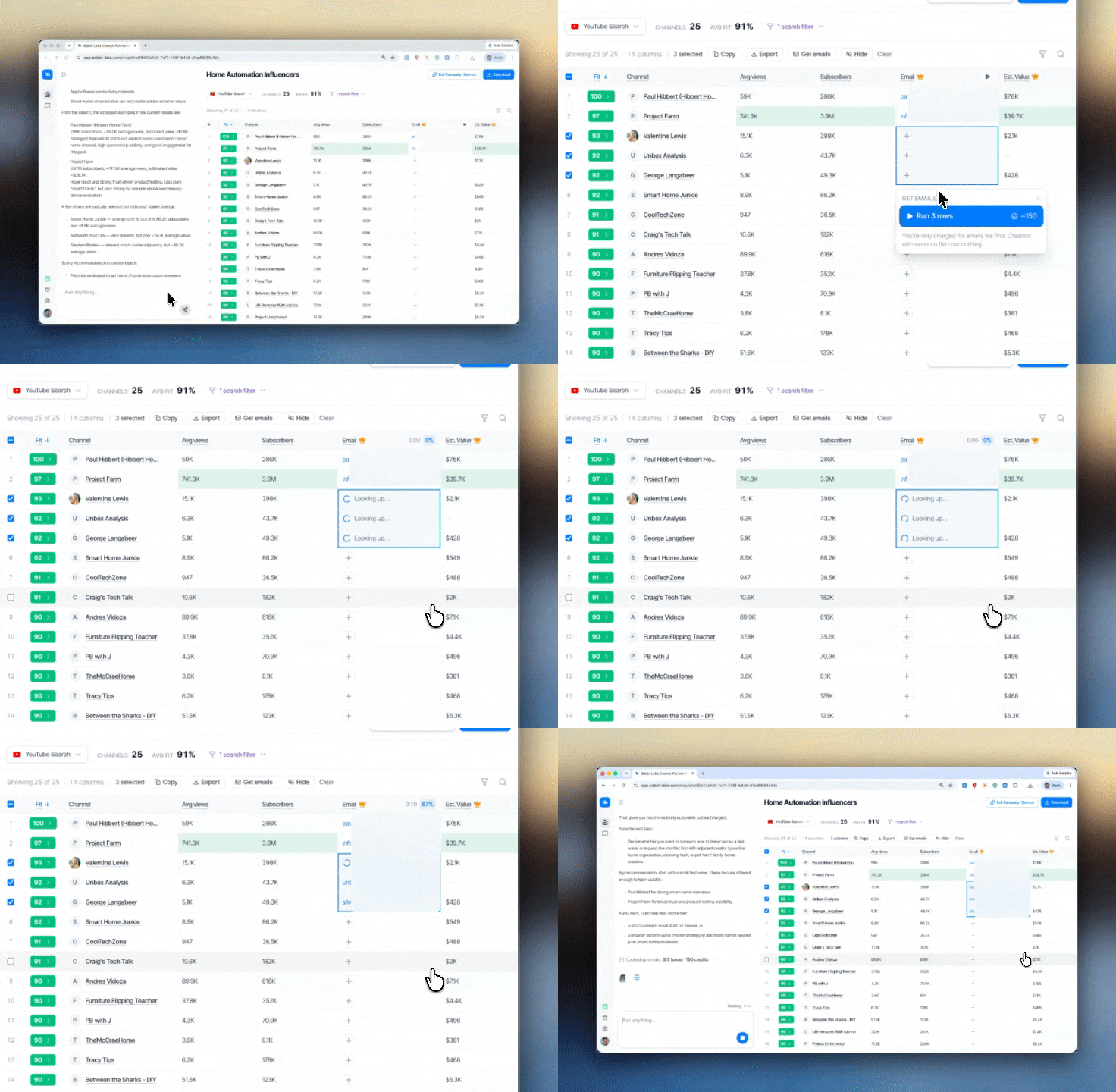
More on how the lookup works and where the emails come from: creator email lookup.
Two things to know. Managed creators route through a manager, which is slower but more reliable, and that manager will ask about BUDGET in message one, so have a number ready. And some will come back empty, which is fine. A creator with no listed contact doesn't want inbound, and chasing them through a DM is a worse use of your time than sending three more emails.
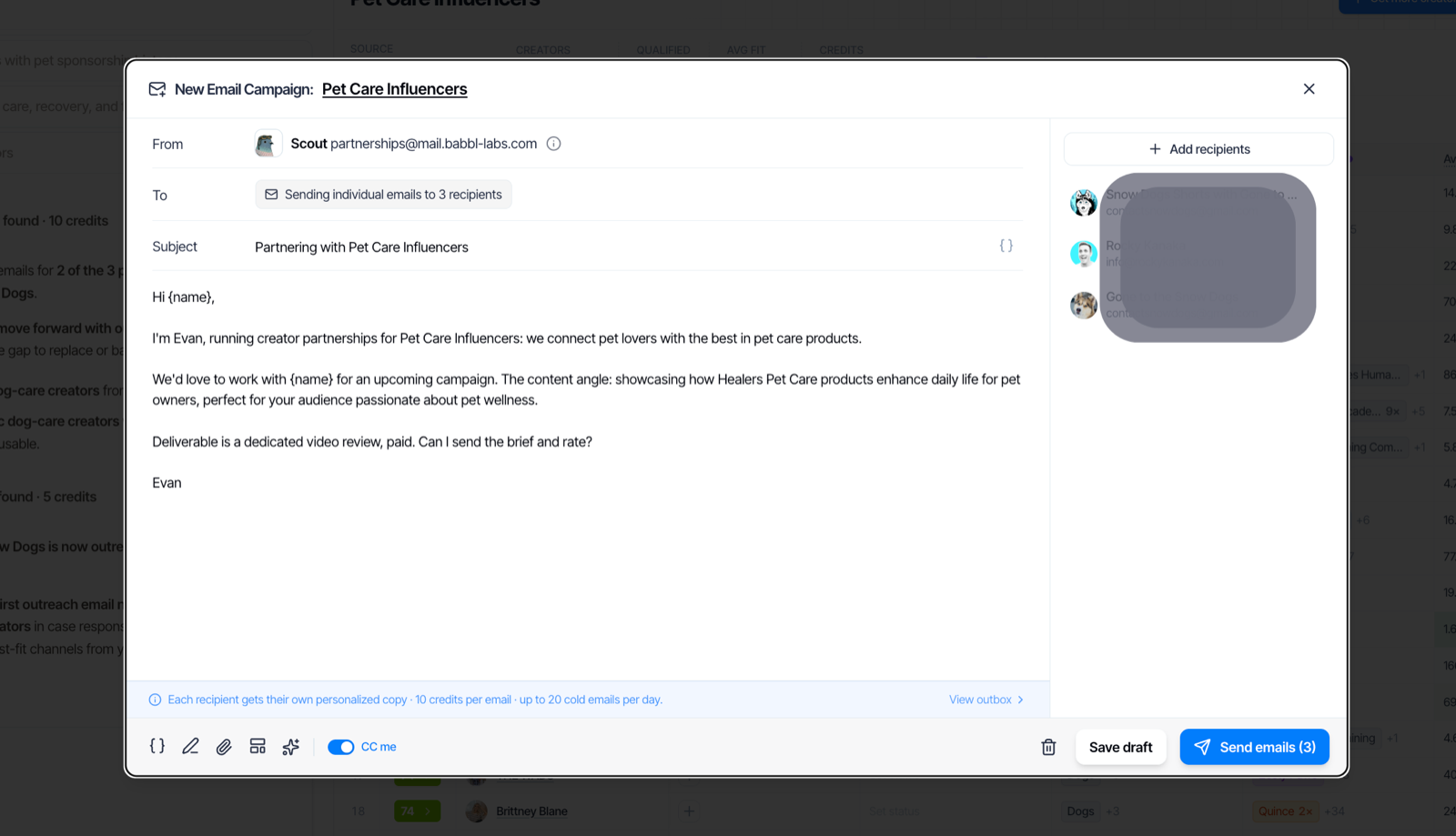
3. Generate drafts. Hit reach out and Scout drafts one message per creator using what it knows about your brand and about them specifically. These are drafts, nothing sends until you say so.
4. Read every single one. This is the step people skip and it's the one that decides your reply rate. On each draft:
- is the specific line actually SPECIFIC? it should reference something only true of this creator. if it'd read fine sent to anybody else, rewrite it
- does it sound like YOU? cut anything you wouldn't say out loud
- is the ask SINGULAR? one question, answerable with a yes
- is there a NUMBER in it? a rate or a range. emails without one get answered last, because the creator can't tell if you're serious
Rewrite two or three properly, find the pattern you want, apply it to the rest.
5. Send. From a real address you'll actually check. If you're the founder, say so in the first line, founder emails get opened and that's the one structural advantage you have over an agency. Stagger them a bit so replies come back in a manageable stream.
6. Handle replies FAST. Speed is the whole game after this point. The fastest-moving brands answer within the hour and get on a call the same week, then give a yes or no by the end of that call rather than "let me run it by the team." Every day you take, somebody else is negotiating for the same slot.
7. Log it. Contacted, replied, passed, signed. Export it. That becomes the input to your next search, per 6.4.
7.2 How much outreach should you send?
Cheapest to most expensive, whether you use Scout or not. Match your BUDGET, not your ambition.
| Tier | What it looks like | Why it works |
|---|---|---|
| Solo / Founder | 10-20 emails, heavily personalized, sent by you | you have the legitimacy because you built the thing. a creator will open an email from a founder. use it while you've got it |
| In-House / Agency | DM-first, plus relationships kept warm between campaigns | community management beats cold volume. broadcast upcoming campaigns to creators you've worked with, and give the good ones repeat deals |
| Scaled | templated at volume, qualify the 10-30% who reply | cheaper to send than to pre-qualify, but only works if you've got the headcount to answer every reply within a day. without that it just burns your name |
These are BUDGET tiers, not competing philosophies. Most people reading this are tier one, and tier one converts best per email sent anyway.
7.3 What reply rate should you expect?
Two numbers, and the gap between them is the whole argument for doing this properly. Cold outreach you write and send yourself lands somewhere around 10-30%. Outreach sent through Scout averages 31%. Published benchmarks elsewhere run from 2% to 60% depending on who's selling you the tool, so be sceptical of any single number, including ours.
What actually moves it, roughly in order:
- A real number in the email. Creators triage by whether they can tell you're serious. No budget, no reply.
- Who it's from. Founder beats marketing@ beats agency.
- Whether the personal line is real. One sentence proving you watched a video outperforms three paragraphs about your brand.
- Creator size. Smaller creators answer far more. Once someone has a manager, your reply rate drops and your rate goes up at the same time.
A brand marketer we know messaged 113 creators, got 12 replies, and all 12 were out of budget. That's a 10.6% reply rate and a 0% usable rate. The reply rate wasn't the problem, the targeting was.
Track your own from campaign one. Your number in your niche at your budget is worth more than anybody's benchmark.
7.4 What to put in your first message to a creator
Four things, in this order, nothing else.
Who you are, one line. Name, brand, what it does. Founder? say so.
Why THEM specifically. Reference a video. Not "I love your content." More like "the piece you did on X is the clearest explanation of it I've found, and it's exactly the objection our customers raise." This line is the whole email. It's the only part that proves a human looked.
What the deal is, and the money. Format, your rough rate or range, timing. Say your number and ask theirs in the same breath. Vagueness reads as a fishing expedition.
One clear ASK. "Are you taking sponsorships for Q4?" is answerable in four words. "Let me know if you'd be interested in exploring a partnership" is not.
Keep it short, six sentences is plenty. And add the line asking them to write and voice the integration themselves.
7.5 Talk price in the first round
Price gets decided here, in the first exchange, not in some later step. By the time you'd hit a "paying creators" checklist the number's usually already set, so walk in with one in your head.
Know your ceiling before you send anything. Work out the most you can pay for a first test before you field a single quote. The next section breaks down how to get to that number. Start fielding offers without a ceiling and every quote sounds reasonable, and you talk yourself into the wrong one.
Ask what they charge in the same message you pitch the deal. Don't make it a two-email dance. "Here's the format and roughly what we've budgeted, what would you want for it?" gets a real number back and tells you fast whether you're in the same range.
If their rate's way over yours, say so plainly. Something like: "for this first round our ceiling is $X, but we'd love to do more if it goes well." It's honest, it anchors, and it keeps the door open. Most creators would rather book a smaller first deal with a path to repeat work than hold out for a number you can't pay.
The rest of the negotiation is short, and it's the same whether you're doing it now or later:
- Come with a number first. anchoring works and it signals you're serious
- Justify it with THEIR numbers. "based on your recent average of X views, we've budgeted Y." nobody argues with their own analytics
- Trade term for price. two videos at a lower per-video rate is an easy yes, because it's guaranteed work
- Be willing to WALK. there are always more channels, that's the entire point of building a shortlist
8. How Much Does a YouTube Sponsorship Cost?
Most brands pay somewhere between $20 and $60 per thousand expected views for a dedicated integration, which puts a typical mid-market deal between $500 and $5,000. The range is wide because the right number depends far more on what a customer is worth to you than on how big the channel is. For the full CPM breakdown by niche and creator size, see our YouTube sponsorship rates report. Want a number before you read the rest of this section? Our YouTube sponsorship price calculator → is free, takes about thirty seconds, and unlike most rate tools it's built for the brand working out what to pay rather than the creator working out what to charge.
8.1 Why big and small creators are both overpriced
Big creators are overpriced because big brands can't attribute properly and anchor against Meta reach, which sets the asking price for everyone at that tier. You're paying a premium created by somebody else's bad measurement.
Small creators are overpriced because the only brands in their inbox are inexperienced ones paying silly numbers. $2,000 for a post that'll do 3,000 views.
The money's in the middle. Too expensive for the clueless, too small for the giants. Practically: creators with real average views and no agency answering their email.
8.2 Flat fee vs CPM vs affiliate: which should you offer?
Offer a flat fee, with an affiliate code on top if the creator wants one.
Flat rates mean viral upside is free, which is the only structural advantage creator content has over paid media. If a video does five times its normal numbers, that's the entire reason you're here. Per-view pricing turns your creator program into expensive Meta ads with a slower turnaround.
Second reason: flat rates are SIMPLE, and simple deals close. Every performance clause is another week of back and forth.
And know what your offer signals. Asking for pure affiliate tells a creator you don't believe it'll work, which is why insisting on it cuts out something like 90% of the market. The creators who accept affiliate-only are disproportionately the ones who couldn't command a rate. Most programs that work are a BLEND.
8.3 How to work out what you can afford to pay
This is the reframe that makes rate conversations easy.
Stop asking "is $4,000 a lot for this creator." Start with what a CUSTOMER is worth to you, work out how many conversions make the deal worthwhile, then check whether that's plausible against their real average views.
A brand with a $400 order value can justify a hundred times the CPM of a $4 app for the identical slot, and both are being completely rational.
"Eight Sleep's RPM is going to be much higher than Cal AI's RPM because their average order value is a hundred times ours."
Rough working: take their worst-case average views, assume a low single-digit percentage click and a small fraction of those convert, multiply by your margin per order. If that clears the rate comfortably it's a good deal, even when the number feels big. Do it by hand once so you understand the shape of it, then let the calculator do it →
8.4 How to negotiate a creator's rate
"A lot of times they're bullshitting. It's like, I want a $50 CPM. And then, oh no, they're actually willing to take a $5 CPM."
Or more politely: what people say they'll accept and what they'll actually accept are not the same thing.
It's not creators being dishonest, it's a market with no public pricing. Most rate cards are aspirational, set once, and never revised down in writing.
The how-to moves live up in section 7, because the negotiation happens inside that first exchange, not after it. Short version: come in with a number, back it with their own view counts, trade an extra video for a lower per-video rate, and be ready to walk.
8.5 Why repeat deals cost less than they look
Paying a bit over your calculated rate is worth it if it turns into a repeat partnership.
The first video with any creator is the expensive one. They're learning your product, you're learning their process, the audience is hearing it for the first time. Second and third videos convert better at the same price, because REPETITION is what actually moves somebody from aware to buying.
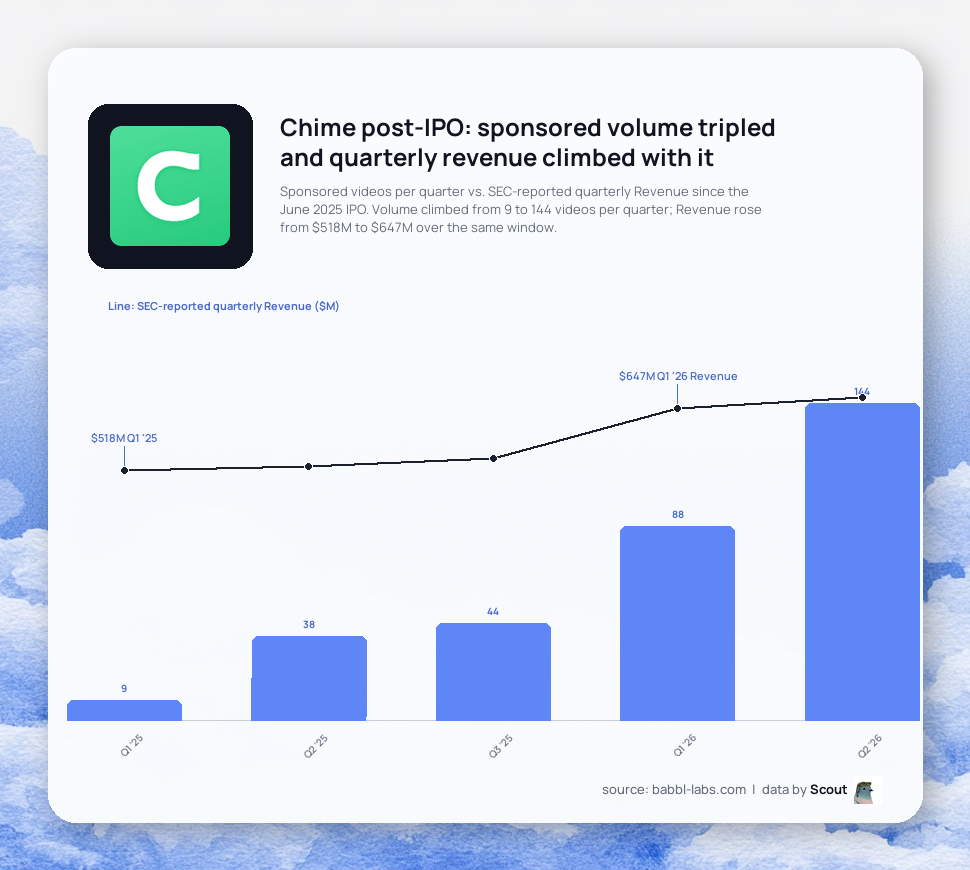
Chime's numbers make the same point at scale: the channels running Chime reads over and over are the ones that actually move members. Full breakdown in our Chime case study.
If a first deal works, lock the next three before somebody else does. Which is also exactly the signal you were reading back in section 5, just from the other side of the table.
8.6 What to put in a YouTube sponsorship brief
Product. What it does. The one thing you legally can't say. Go.
Heavy briefs (ten-page decks, mandatory talking points, word-for-word scripts, three rounds of revisions) turn the content into an AD, and then everyone's confused when it performs like one. You're paying for the skill that built their audience. Over-engineering removes the only thing that made the deal worth doing.
There's a hard ceiling on it too: you can micromanage ten partnerships, you cannot micromanage a hundred. If you ever want this to scale, the brief has to be light enough to work unattended.
| Include | Leave out |
|---|---|
| what the product is and who it's for, two sentences | the script |
| the one or two things that must be said | tone guidance and brand adjectives |
| the one thing that legally can't be | required b-roll |
| the code or link, and where it goes | the approval checkpoint |
| a note asking them to write and voice it themselves | anything you hired them to be better at than you |
Scout doesn't write your brief and shouldn't. A Google Doc they can read in two seconds is the right format.
9. After the Yes: Briefing the Creator
You agreed on a price. The instinct now is to send a shot list and a page of rules. Don't. The reason this creator is worth paying is that their audience trusts them, and the fastest way to burn that trust is to make them read your ad copy in your voice.
Buy a conversation, not a placement. A placement is a logo on a jersey. A conversation is a person their audience trusts making an actual case for you. You're paying for the second thing. Brief for it.
Let the creator write it, then approve. Give them the point, not the script. You bring the what to land, they bring the how to say it, then you approve before it ships. Hand over a word-for-word script and you get a video that sounds like an ad, because it is one.
What a great sponsored video actually does
Most sponsored videos are forgettable because the creator just holds up the product and says the name. The ones that move product do four things. Put these in every brief:
- Persuade. They make a case for why it matters, not just that it exists. "I use this" is nothing. "I use this because it's the only one that does X" is something.
- Name the problem. They point at a specific thing the audience is dealing with, then position you as the fix. Vague benefit, no sale.
- Show the habit. They convey how often they use it. "Every morning" beats "I tried this."
- Drive to trial. They actively tell the audience to go try it. Not "check them out." Try it.
A good brief doesn't script the creator. It hands them these four beats and lets them hit them in their own words.
Format: go mid-roll. A mid-roll integration, dropped into the middle of the video where the audience is already locked in, beats a pre-roll they skip or an end-roll they've clicked away from. If you have any say in placement, ask for mid-roll.
Put it in writing before the shoot. Deliverable, post window, usage rights (can you re-run the clip in paid ads later?), and any exclusivity. Sort this before they film, not after.
10. Paying Creators
By the time you're here the price is already set. You agreed it in that first exchange back in section 7. This section is just the mechanics of paying, plus one reminder on pricing so you don't overpay in the first place.
How to structure the deal
Flat fee is the default and it's fine. You're paying a set number for a defined deliverable. Keep it simple:
- Deposit on signature, balance on post. Half up front, half when it goes live and meets the brief. Protects both sides.
- Get the deliverable spec in writing. One video, one platform, one post window. Scope creep is where these go sideways.
Price off the floor, not the home run
The single most expensive mistake is pricing off a creator's best video. One viral hit is not what your video will get.
Price off the 25th percentile of their recent views, not the median, and never off subscribers. The 25th percentile is your safety net. If the deal still works at their floor, you can't lose.
Subscriber count is a vanity number. A 15k-sub creator can pull millions of views; a million-sub creator can pull 10k. You're paying for the video, not the number next to their name.
If they push back on price
That conversation really belongs back in section 7, in your first round with them. If it resurfaces at payment time the levers are the same: a shorter intro deal to prove it out, a commission on sales if they're open to it, or a higher recurring rate once the first one converts. And state your timeline. "I need an answer by Friday" gets you an answer by Friday.
11. Tracking and Attribution
This is the part everyone fumbles, and it's why leadership thinks creators are "nice to have." Attribution on YouTube is not a perfect science. Nobody's is. The goal is to do it better than you're doing it now, and better than you can on paid at retail.
The methods, stacked
Use more than one. No single method catches everything.
- Unique promo codes and links per creator. One code, one UTM'd link per partner. Now you know who drove what.
- Dedicated landing pages. Send the click to
yoursite.com/creatorname, not your generic homepage. Cleaner tracking, and the page can speak to that creator's audience directly. - A post-purchase survey. Add a "where'd you hear about us?" at checkout. Cheap to set up, and it catches the buyers who saw the video, didn't click the link, and searched you up three days later. That's most of them.
What to actually count
Count conversations started, not impressions served. The ROAS shows up in month 2 and 3, not week 1.
Creator marketing is top-of-funnel that closes downstream. Someone sees the video, doesn't buy, remembers you, buys later through a channel that gets the credit. If you only measure last-click, you'll kill the thing that's building your pipeline. Measure first-touch (the survey) and directional signal (codes, referral traffic, branded search lift), and give it two to three months.
Don't get lost in the weeds
You'll get objections like "won't a long tracking link scare off mobile users?" Maybe, at the margin. Acknowledge it, handle it, move on. That's icing. The cake is: your customer needs to hear about you from someone they trust, and this is how. Don't let a detail about link length derail the channel.
12. Scaling Your Program
Once one campaign works, the temptation is to blast outreach at 500 creators a week. Resist it. The brands that scale well go deep first.
Go deep before you go wide. Pick one or two audience personas (say, runners focused on recovery, or parents sneaking protein into a kid's dinner) and master the message for them. Nail the brief and the creator fit for a narrow group, learn what lands, then widen. Throwing stuff at every demographic at once teaches you nothing.
Rebook what converts. When a creator works, book them again before you go shopping for someone new. Rebook a winner three times before you add a stranger. Consistency compounds; a rotating cast of one-offs doesn't.
Build a roster in tiers. A mature program isn't one campaign, it's a bench:
- Seed and gift small creators who already love you. Low cost, high authenticity.
- Ambassadors who post regularly in exchange for product and the occasional incentive.
- Paid partners on flat fees for your bigger swings.
Creators graduate up the tiers. A small creator who crushes a gifted post becomes a paid partner. That's your farm system.
Cadence over campaigns. The goal is always-on, not a launch every quarter. A steady drip of seeding and partnerships beats a big one-off push and then silence.
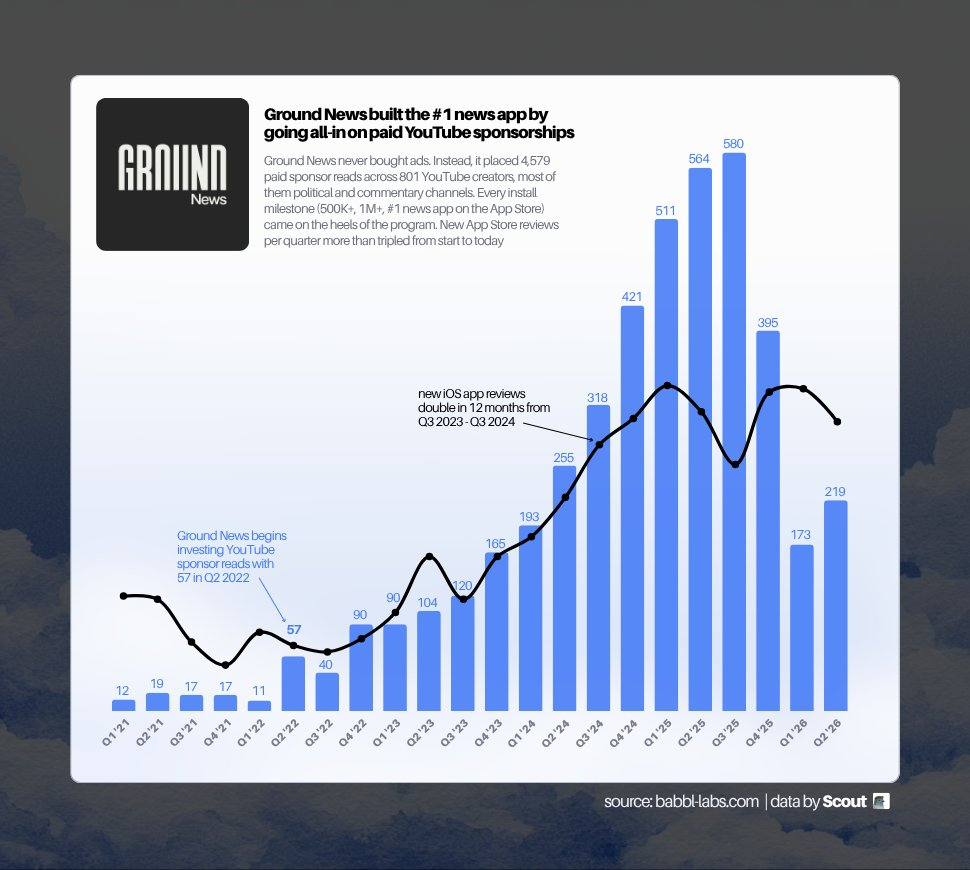
Ground News ran YouTube sponsorships every quarter for five years, from 11 reads a quarter in early 2022 up to hundreds a quarter now. Reviews (a proxy for installs) tracked it. Cadence is the whole point. Full case study →
Keep it a relationship, not a transaction. Counterintuitive but real: low-pressure, no-strings outreach beats the transactional "did you post yet? did you like it?" follow-up. The check-ins get annoying and make the whole thing feel like a job. Reach out like a person who genuinely likes their work, and your response and post rates go up.
What it takes to run. Start with one person who owns the channel and learns it cold. Add a coordinator and, when volume demands, a support team for the high-bandwidth prospecting and tracking. One owner who knows the game deeply beats five people spraying DMs.
Wire it into your other tools. Once the playbook is stable, plug Scout into the LLM you already work in. The Scout MCP lets Claude or Cursor run creator searches, pull rates, and draft outreach from your existing agent — same data, no context switch. See the Scout × Claude MCP walkthrough for setup.
The end state: a standing roster across tiers, mostly smaller creators carrying real trust, rebooked because they convert, running on a cadence you barely have to think about. That's a creator engine, not a campaign.
13. Common Mistakes Brands Make With YouTube Sponsorships
- Tell a COVERAGE WALL from a bad prompt. Some niches are deep (men's lifestyle, fitness, wellness, outdoor, gaming, tech), some are genuinely thin, and some geographies are thinner than others. Empty search is usually the category, not your phrasing. Ask for the next closest thing instead of rewriting six times, or have Scout go crawl new channels for that niche.
- Test a niche 3-5 times before you judge it. One creator is NOT a test. Different creators, different angles, same niche. Any sign of life, push. Crickets across all of them, kill it and move on.
- One chat per vertical. Don't build a mega-search (see 6.3).
- Export as you go, so round two isn't round one again (see 6.4).
- Watch the videos. Ten minutes on your top five. No tool does this part, including ours.
- Ask creators to voice their own reads. Most common way a good deal quietly turns into a bad one.
- SPEED is the only moat. Taste isn't defensible and neither is the playbook, both get copied inside a month. How fast you test, kill the losers and double down on the winners is.
One more thing, and it's the reason we bang on about spreading a first test. A campaign that misses doesn't just fail to return, it EATS the budget that would've funded the next three tests. Two bad swings early can end a small brand's YouTube program before it really starts.
Frequently Asked Questions
How much does a YouTube sponsorship cost?
Anywhere from a few hundred dollars to six figures, and honestly it depends far more on your PRODUCT than on the creator. Rates usually get quoted as a CPM against expected views, and the mid-market tends to sit around $20-60 per thousand views for a dedicated integration.
The number that matters isn't the rate though, it's whether the rate works against your average order value. Figure out what a customer is worth to you, estimate conversions off the creator's worst-case average views, see if the math clears. Don't use another brand's benchmark, their margins aren't yours. For a starting number on a specific channel, use the price calculator →
How many YouTube creators should you start with?
Five to ten live, which means messaging 10-20.
Under five and you can't tell a bad creator from a bad audience, so you learn nothing either way. Over ten and the budget's gone before the first video's up. Spread the same money across five creators instead of one and you get five data points, five shots at an outlier, and an actual read on whether the niche works.
How do you know if a creator's audience matches your customer?
Three checks, in order of how much they tell you.
Watch two minutes of a normal recent video and ask whether you'd trust this person's judgment on something that costs money. Read the comments for real questions and arguments rather than emoji. Check their Sponsorship History for brands whose customer looks like yours, especially anybody who came back for a second deal.
Topical relevance is the WEAKEST signal available and the one most people rely on entirely. A channel about your category is not the same thing as a channel your customer trusts.
Can you see a YouTube creator's audience demographics?
Not publicly. YouTube shows audience age, gender and location only to the channel owner inside their own Studio analytics.
You have three options: infer it free from comments, past sponsors and content; ask the creator for a Studio screenshot during negotiation, which most professionals will send without blinking; or pay a third-party tool for a modelled estimate. Use the free signals to build the shortlist and ask for real analytics before money changes hands.
What do I do if Scout doesn't return any results?
Usually it's COVERAGE, not phrasing. Some niches and geographies are genuinely thin and rewriting the same query six ways won't conjure channels that aren't there.
Try, roughly in this order: drop your most restrictive filter (usually subscriber range or country), ask for the closest adjacent topic rather than the exact one, describe your CUSTOMER instead of your product category, or have Scout go find new channels in that niche and email you when they're indexed.
And if a niche is thin on YouTube, that's genuinely worth knowing before you build a campaign around it.
Should you pay a flat fee or run affiliate?
Flat fee, with affiliate on top if the creator wants it.
Flat rates mean viral upside is FREE, which is the whole structural advantage of creator content over paid media. They're also simpler, and simple deals close faster.
Pure affiliate is tempting because there's no upfront risk, but insisting on it removes something like 90% of the creators in the market, and the ones who say yes are disproportionately the ones who couldn't command a rate. Most programs that work are a BLEND: a flat fee that makes it worth their time, plus a code so both sides can see what happened.
What reply rate should you expect from creator outreach?
Around 10-30% if you're writing and sending it yourself. Scout's average across creator outreach is 31%. Published benchmarks elsewhere range from 2% to 60%, mostly from vendors selling outreach tools, so treat any single number carefully.
The biggest lever is putting a real budget number in the first email. After that: who it's from (founder beats marketing@ beats agency), whether your personal line proves you actually watched a video, and creator size, since smaller creators answer far more often.
How long from first message to a video going live?
4-8 weeks is typical. About a week to get a reply, one to two to agree terms, two to six of production depending how booked they are. Bigger creators book further out, and a Q4 slot often has to be reserved by August.
You can compress the front half a lot by replying fast and putting a number in message one. You can't compress the production half, and pushing on it is how you end up with a rushed integration.
Need Help?
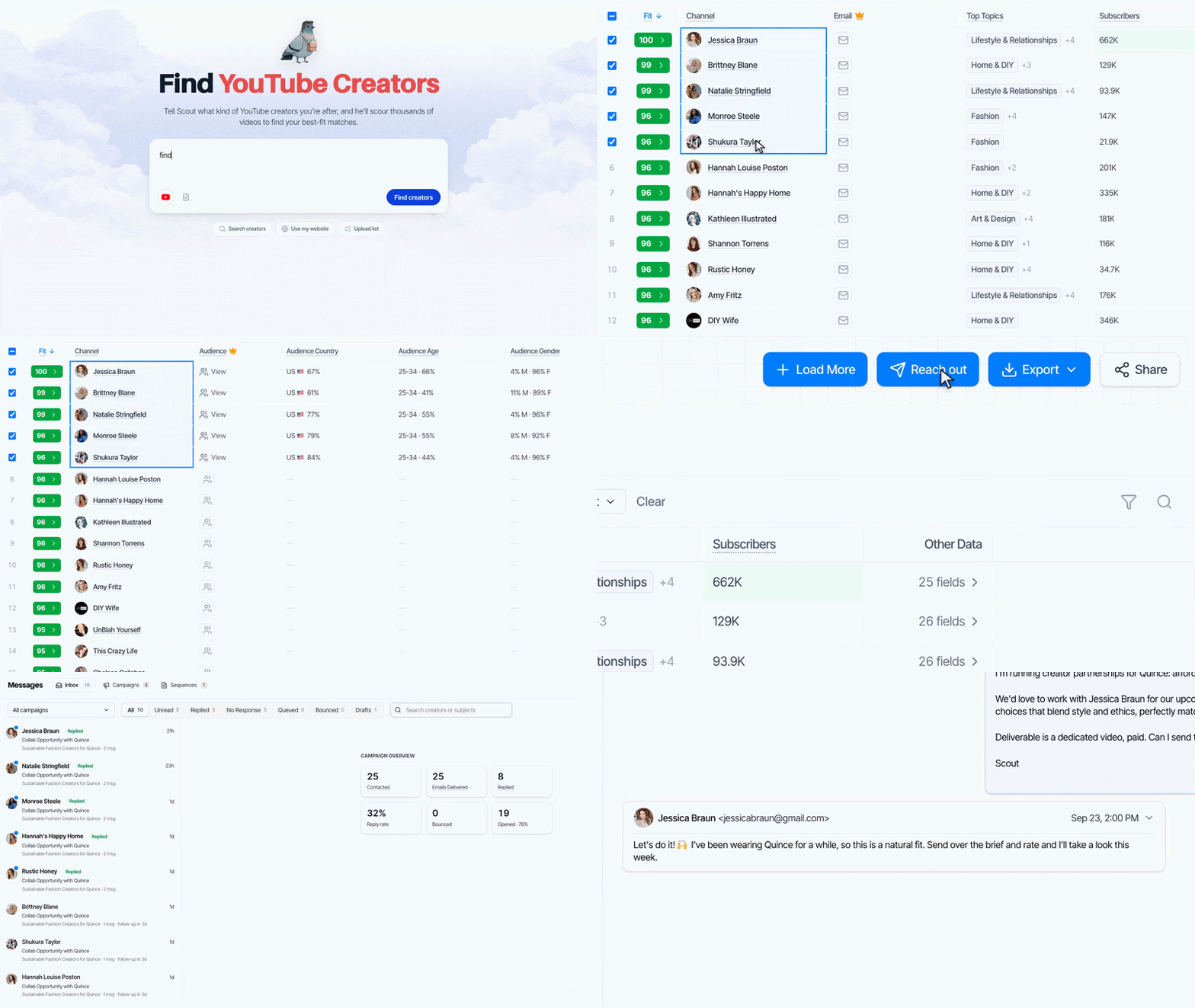
Not sure where to start? Send us the URL of a competitor who's already sponsoring on YouTube. We'll send back the three creators they work with most, free. Start a search and see your first 100 creators free →
Questions, or something not working? Email evan@babbl.dev or ramsey@babbl.dev. Enjoy, Evan
Frequently asked questions
- How much does a YouTube sponsorship cost?
- Anywhere from a few hundred dollars to six figures, and it depends more on your product than the creator. Rates are usually quoted as a CPM against expected views, with the mid-market around $20-60 per thousand views for a dedicated integration. What matters is whether that rate clears against your average order value, not another brand's benchmark.
- How many YouTube creators should you start with?
- Five to ten live creators, which means messaging 10-20. Under five and you can't separate a bad creator from a bad audience, so you learn nothing. Over ten and the budget is gone before the first video is up. Spreading the same money across five creators gives you five data points and five shots at an outlier.
- How do you know if a creator's audience matches your customer?
- Three checks, strongest first. Watch two minutes of a recent video and ask whether you would trust this person's judgment on something that costs money. Read the comments for real questions rather than emoji. Check their sponsorship history for brands whose customer looks like yours, especially anyone who came back for a second deal. Topical relevance is the weakest signal and the one most people over-rely on.
- Can you see a YouTube creator's audience demographics?
- Not publicly. YouTube shows audience age, gender, and location only to the channel owner in their own Studio analytics. You have three options: infer it free from comments, past sponsors, and content; ask the creator for a Studio screenshot during negotiation, which most professionals send without blinking; or pay a third-party tool for a modelled estimate. Use free signals to build the shortlist and ask for real analytics before money changes hands.
- What do you do if a creator search returns no results?
- Usually it is coverage, not phrasing. Some niches and geographies are genuinely thin, and rewriting the same query six ways won't conjure channels that aren't there. Drop your most restrictive filter (usually subscriber range or country), ask for the closest adjacent topic, describe your customer instead of your product category, or have new channels indexed in that niche. If a niche is thin on YouTube, that is worth knowing before you build a campaign around it.
- Should you pay a flat fee or run affiliate?
- Flat fee, with affiliate on top if the creator wants it. Flat rates mean viral upside is free, which is the structural advantage of creator content over paid media, and simple deals close faster. Pure affiliate removes roughly 90% of the creators in the market, and the ones who accept are disproportionately those who couldn't command a rate. Most programs that work are a blend: a flat fee plus a code so both sides can see what happened.
- What reply rate should you expect from creator outreach?
- Around 10-30% if you write and send it yourself; Scout averages 31% across creator outreach. Published benchmarks range from 2% to 60%, mostly from vendors selling outreach tools, so treat any single number carefully. The biggest lever is putting a real budget number in the first email, followed by who it is from (founder beats marketing@ beats agency) and a personal line proving you watched a video.
- How long does it take from first message to a video going live?
- 4-8 weeks is typical: about a week to get a reply, one to two to agree terms, and two to six of production depending on how booked the creator is. Bigger creators book further out, and a Q4 slot often has to be reserved by August. You can compress the front half by replying fast and putting a number in message one, but you can't compress production without risking a rushed integration.