Weekly Scout Updates (Oct 26 to Nov 1)
Scout tells you when your creators' sponsored videos go live, and how they're doing.

Here's what's new in Scout this week. Scout took 3 jobs off your plate: checking when videos go live, logging your creator emails, and keeping clients updated. 👇
What's new this week
- Scout air-checks your videos from live campaigns. Scout watches your signed creators' channels every day. When a sponsored video goes live, it finds where they mention your brand and shows the video's views, likes, comments and cost per 1,000 views (CPM) in your campaign's new Content tab.
- Add Scout to your email threads and it tracks them. Already emailing creators from your own inbox? Every campaign now has its own email address. CC it or forward the thread to it, and Scout updates each creator's status (contacted, replied, signed) for you.
- Shareable view-only campaigns for clients. Send your client a link to the whole campaign, or just the creators you pick. They can look but can't change anything, and your emails and notes stay private.
- Track creator payments and deliverables in your campaigns. See each creator's rate, what they agreed to make for you and what you've paid them, with a running total of what you've spent.
- Steer your searches with 👍 and 👎. Like or dislike a search or a creator, and Scout uses it to find you better matches next time.
Your new Scout dashboard and onboarding tour
Scout now opens on a dashboard that shows everything in one place:
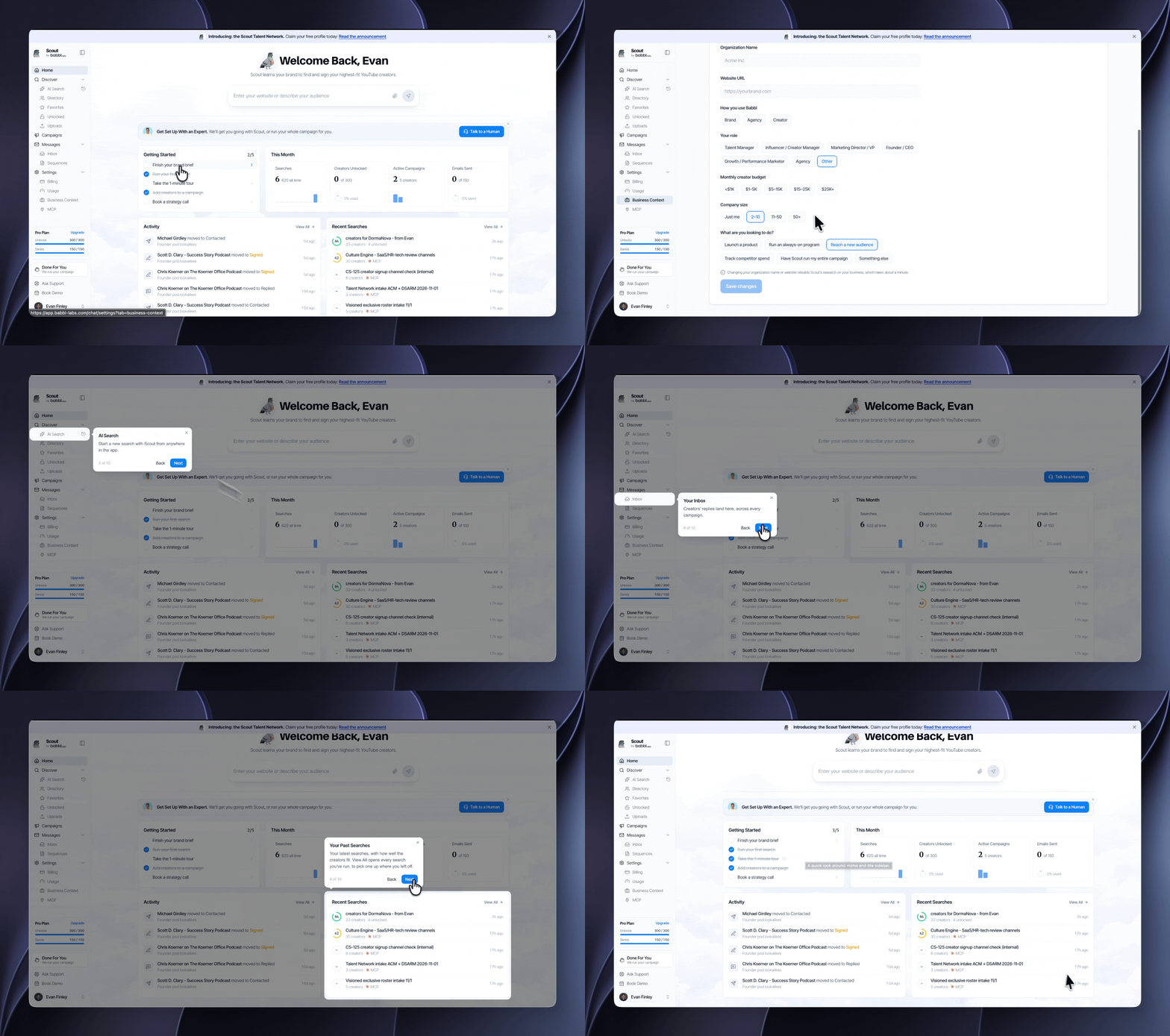
- This month: how many searches you've run, creators you've unlocked, campaigns you have going and emails you've sent, and how much of your plan you've used
- Activity: every time a creator replies, sends you a price or signs
- Recent searches: jump back into any search you've run
- Getting started: 5 quick steps from setting up your brand to launching your first campaign, including a 1-minute tour of the app
- Talk to a human: book time with our team to get set up, or have us run the whole campaign for you
Let Scout launch your next campaign:
More Soon
Running a campaign this month? Drop the brand in a reply and we'll help you set it up.
In case you missed it
- Campaigns Are Live in Scout: last week's launch, from your first email to your final results, with video.
Cheers,
Sam
Frequently Asked Questions
How does Scout track when a campaign video goes live?
Scout watches your signed creators' channels every day. When a sponsored video goes live, it finds where they mention your brand and shows the video's views, likes, comments and cost per 1,000 views (CPM) in your campaign's new Content tab.
Can I forward my own creator emails into Scout?
Yes. Every campaign has its own email address. CC it or forward the thread to it, and Scout updates each creator's status (contacted, replied, signed) for you.
Can I share a campaign with my client?
Send your client a link to the whole campaign, or just the creators you pick. They can look but can't change anything, and your emails and notes stay private.
What's new on the Scout dashboard?
Scout now opens on a dashboard that shows this month's usage, every creator reply and signing in Activity, your recent searches, a Getting Started checklist with a 1-minute tour, and a shortcut to book time with the team.